
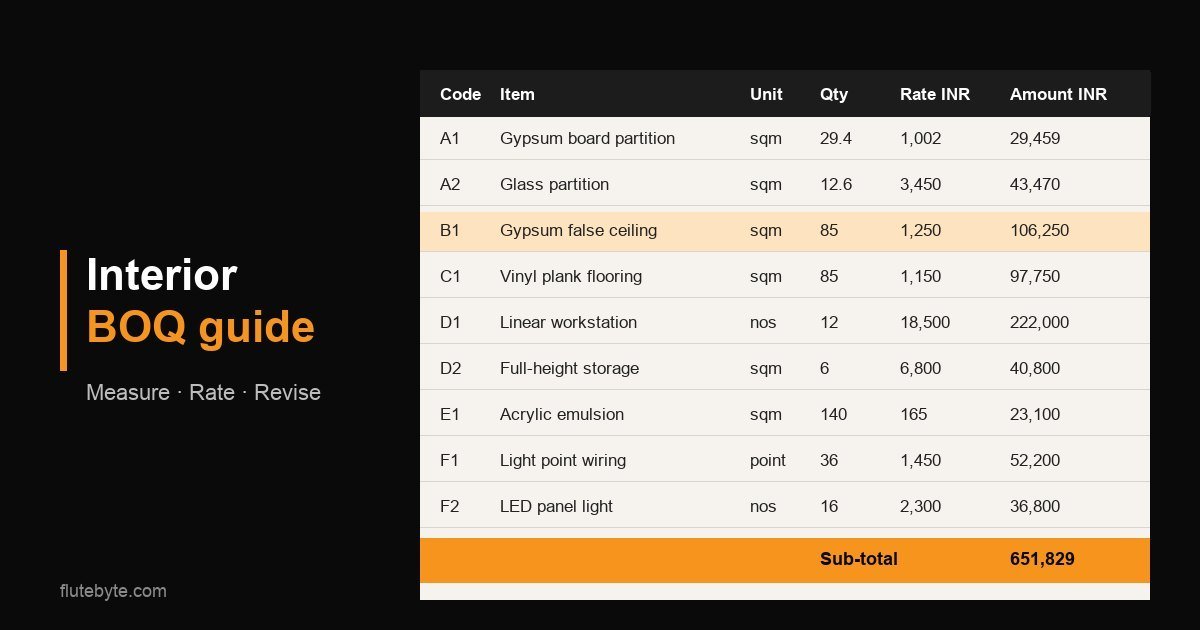
A Bill of Quantities is the document every later number in an interior project leans on: the client’s price, the purchase budget, the running bills and the final margin. This guide walks through preparing one for interior works step by step, with a measured quantity, a built-up rate, a full sample BOQ, a revision example and a free Excel template.
In this guide
- What an interior BOQ is
- What you need before you start
- How an interior BOQ is structured
- Measurement units by trade
- Writing item descriptions and specifications
- Worked example: measuring a quantity
- Worked example: building a rate
- Sample interior BOQ
- Common BOQ mistakes
- BOQ versions, variations and approvals
- Connecting the BOQ to procurement
- Connecting the BOQ to cost tracking
- Illustrative project walkthrough
- Excel vs BOQ software
- Download the Excel template
- Common questions
01What an interior BOQ is
A BOQ (Bill of Quantities) breaks an interior scope into measurable items. Each line answers five questions: what is being built, to what specification, in what unit, how much of it, and at what rate. Multiply quantity by rate and you have the item amount. Add the items and you have the price of the work.
In tendered work, the client or their consultant (often a quantity surveyor or PMC) prepares the BOQ and contractors price it. In design-and-build and turnkey interior work, the contractor usually prepares it from their own design. Either way, the document does three jobs:
- Pricing. It turns drawings into a price the client can compare and approve.
- Control. Once approved, it sets the budget each purchase, work order and site measurement is checked against.
- Billing. Running Account (RA) bills are usually certified against BOQ items and quantities.
A BOQ is not the same as a BOM (Bill of Materials). The BOQ describes finished work the client pays for, such as “sqm of gypsum partition”. The BOM breaks that work into the boards, studs, screws and tape your purchase team buys. Our post on linking purchase orders to the approved BOM covers that second step.
02What you need before you start
Most BOQ errors start before the first line is typed. Collect these first:
- Approved drawings: layout, reflected ceiling plan, electrical layout, elevations and joinery details. Note the revision number of each.
- Finish and material schedule: board types, laminate codes, flooring, paint systems and hardware brands, or “or equivalent” rules.
- The agreed measurement method. In India, contracts often refer to the IS 1200 series from the Bureau of Indian Standards. UK and many GCC projects use RICS NRM 2 (detailed measurement for building works). Many private interior contracts simply define their own rules. Use whichever your contract names.
- Scope boundaries: what is in and out (MEP, HVAC, loose furniture, civil repairs, permits, after-hours work).
- Site survey: actual slab heights, wall conditions and existing services. Drawings and site rarely agree perfectly.
- Commercial terms: tax treatment, retention, payment stages and whether rates are supply-only, install-only or supply-and-install.
03How an interior BOQ is structured
A usable interior BOQ has four levels. Keeping them consistent is what makes the BOQ readable for the client and machine-usable for procurement later.
Typical interior work categories are: demolition and site preparation; partitions and wall linings; false ceilings; flooring and skirting; joinery and loose furniture; doors and hardware; painting and wall finishes; electrical, data and lighting; plumbing and sanitary; HVAC (often a separate package); signage; and preliminaries such as site protection, cleaning and debris removal.
Give every item a stable code (A1, A2, B1…). The code is what links the BOQ to purchase orders, measurement sheets and RA bills, so do not renumber items when you issue a revision. Add new items with new codes instead.
04Measurement units by trade
| Trade | Usual unit | Notes |
|---|---|---|
| Partitions, wall cladding | sqm (or sqft) | Measured on one face. State whether openings are deducted. |
| False ceiling | sqm | Bulkheads and drops are often separate items in rmt. |
| Flooring | sqm | Skirting is usually measured separately in rmt unless the item says “incl. skirting”. |
| Painting | sqm | Specify the number of coats and the surface preparation. |
| Joinery: workstations, desks | nos | Size and configuration belong in the description. |
| Joinery: wardrobes, storage | sqm or rft | State the measuring face (front elevation is common). |
| Cornices, beading, profiles | rmt | Running metre along the length. |
| Electrical points | point | Define what a “point” includes: wire, conduit, switch, plate. |
| Fixtures, sanitaryware | nos / set | Supply and install, or install only. |
| Small items with unclear quantity | LS (lump sum) | Use sparingly. A lump sum is hard to measure for RA bills. |
Pick metric or imperial and stay with it across the document. Indian residential interiors are often priced per sqft, while commercial fit-out BOQs in India and the GCC more often use sqm. Mixing the two in one BOQ is a reliable source of tenfold errors (1 sqm ≈ 10.764 sqft).
05Writing item descriptions and specifications
A good item description lets two contractors price the same thing. A useful pattern is:
| Weak | Usable |
|---|---|
| Gypsum partition | Providing and fixing 75 mm gypsum partition on GI studs at 610 mm c/c, 12.5 mm board both faces, joints taped and finished ready for paint. Measured on one face; openings over the agreed threshold deducted. |
| Workstation | Linear workstation 1200 × 600 mm, 25 mm pre-laminated particle board top, powder-coated metal leg, mobile pedestal with 3 drawers and central lock, wire manager. Per seat. |
| Painting | Two coats of acrylic emulsion over one coat of primer on existing putty-finished wall surfaces, shade as approved. |
Where the client wants a particular brand, write the brand with “or approved equivalent” and state who approves equivalents. That one phrase settles many procurement disputes before they start.
06Worked example: measuring a quantity
Quantities come from a measurement sheet (sometimes called dimension paper), never straight from a mental estimate. The sheet records each element, its dimensions and whether it is added or deducted, so anyone can check the figure later.
Illustrative example. Figures are not actual client data or current market quotations.
| Element | Nos | Length (m) | Height (m) | Quantity (sqm) | Add / deduct |
|---|---|---|---|---|---|
| Cabin wall 1 | 1 | 6.00 | 3.00 | 18.00 | Add |
| Cabin wall 2 | 1 | 4.50 | 3.00 | 13.50 | Add |
| Door opening | 1 | 1.00 | 2.10 | 2.10 | Deduct |
| Net quantity for A1 | 29.40 | ||||
Door deduction = 1.00 × 2.10 = 2.10 sqm
Net quantity = 31.50 − 2.10 = 29.40 sqm
Two points that change the answer on real projects:
- Height. Is the partition measured to the false ceiling or to the slab? Full-height acoustic partitions go to the slab, which adds the ceiling void height to every metre of wall.
- Deduction rules. Measurement standards typically set a size below which openings are not deducted. Some private contracts deduct every opening. Check your contract before deducting a door, and write the rule in the BOQ preamble so the client’s QS measures the same way.
07Worked example: building a rate
A rate is not a number from the last project. Build it from its parts so you can defend it to the client and track it against purchase prices later. The example below prices item A1 per square metre.
Illustrative example. Figures are not actual client data or current market quotations.
| Component | Basis | ₹ per sqm |
|---|---|---|
| Material: board, studs, track, screws, tape | Supplier quotes | ₹620.00 |
| Wastage | 5% of material | ₹31.00 |
| Labour | Gang output | ₹180.00 |
| Sundries and consumables | Allowance | ₹40.00 |
| Prime cost | ₹871.00 | |
| Overheads and profit | 15% of prime cost | ₹130.65 |
| Rate (rounded) | ₹1,002.00 |
Overheads and profit = ₹871.00 × 15% = ₹130.65
Rate = ₹871.00 + ₹130.65 = ₹1,001.65 → ₹1,002 per sqm
Note the difference between markup and margin. A 15% markup on cost is not a 15% margin on price. Here, ₹130.65 ÷ ₹1,001.65 = 13.0% of the selling rate. Contractors who confuse the two consistently price below the margin they think they are earning.
08Sample interior BOQ
Here is a complete small BOQ for an 85 sqm office area with one cabin and twelve workstations. The same rows are pre-filled in the downloadable template so you can see the formulas working.
Illustrative example. Figures are not actual client data or current market quotations.
| Code | Category | Description and specification | Unit | Qty | Rate | Amount |
|---|---|---|---|---|---|---|
| A1 | Partitions | Gypsum board partition 75 mm GI stud, 12.5 mm board both faces, jointed and taped | sqm | 29.4 | ₹1,002 | ₹29,458.80 |
| A2 | Partitions | Glass partition 12 mm toughened clear glass, aluminium top and bottom channel | sqm | 12.6 | ₹3,450 | ₹43,470.00 |
| B1 | Ceiling | Gypsum false ceiling 12.5 mm board on GI frame, plain, incl. cut-outs for lights | sqm | 85 | ₹1,250 | ₹1,06,250.00 |
| C1 | Flooring | Vinyl plank flooring 3 mm LVT, glue-down on levelled screed, incl. skirting | sqm | 85 | ₹1,150 | ₹97,750.00 |
| D1 | Carpentry | Linear workstation 1200 x 600 mm, 25 mm laminated top, mobile pedestal | nos | 12 | ₹18,500 | ₹2,22,000.00 |
| D2 | Carpentry | Full-height storage 18 mm BWP ply carcass, laminate finish, measured on front face | sqm | 6 | ₹6,800 | ₹40,800.00 |
| E1 | Painting | Acrylic emulsion Two coats on one coat primer, over existing putty | sqm | 140 | ₹165 | ₹23,100.00 |
| F1 | Electrical | Light point wiring 1.5 sq mm FR copper in PVC conduit, switch and plate | point | 36 | ₹1,450 | ₹52,200.00 |
| F2 | Electrical | LED panel light 600 x 600 mm, 36 W, supply and install | nos | 16 | ₹2,300 | ₹36,800.00 |
| Sub-total | ₹6,51,828.80 | |||||
| GST at 18% (assumed for this example; confirm the rate and treatment that apply to your contract) | ₹1,17,329.18 | |||||
| Total including GST | ₹7,69,157.98 | |||||
Where the money sits: sample BOQ by work category
Sub-total excluding GST, ₹. Illustrative data from the sample BOQ above.
In this example carpentry is 40.3% of the BOQ, because twelve workstations dominate the scope. The practical point: your rate analysis effort should follow the money. A 5% error on carpentry here moves the price by ₹13,140. The same error on painting moves it by ₹1,155.
09Common BOQ mistakes
| Mistake | What happens on site | Prevention |
|---|---|---|
| Measuring from superseded drawings | Quantities don’t match what is built; disputes at RA billing | Record the drawing revision against every measurement |
| “As per design” specifications | Purchase buys the cheapest option; client rejects it | Name material, thickness, finish and brand or equivalent |
| Mixing sqm and sqft | Tenfold pricing errors on single lines | One unit system per BOQ, stated in the preamble |
| Missing items (skirting, bulkheads, cut-outs) | Unpriced work the client expects to be included | Trade-by-trade checklist against the drawings |
| Wastage hidden in quantities | Client’s QS strips it out; your margin goes with it | Keep wastage in the rate analysis, not the quantity |
| Overusing lump sums | No way to measure partial progress for RA bills | Break LS items into measurable parts |
| Renumbering items between versions | POs and bills point to the wrong item | Codes are permanent; add new codes for new items |
10BOQ versions, variations and approvals
Interior scope moves. Clients change a finish, add a meeting room or drop a pantry. The BOQ has to move with it, without losing track of what was originally agreed. A simple discipline works:
Rules that keep this honest:
- Never edit an approved version. Create a new one and log why.
- Every version records who changed it, the date, the reason (for example “VO-01”) and the value before and after. The template’s Revision log sheet does this.
- No purchase for varied work until the variation is approved in writing. Otherwise the cost is real but the revenue is not.
Our earlier article on why interior projects go over budget even after BOQ approval looks at what happens when this discipline breaks.
11Connecting the BOQ to procurement
Once approved, each BOQ item becomes a purchase budget. When the purchase team sends an RFQ, the comparison should not stop at the unit rate. Here is a comparison for 30 units of the same specified material, where the site needs delivery within 7 days.
Illustrative example. Figures are not actual client data or current market quotations.
| Vendor | Unit rate | Material | Freight | Landed (pre-tax) | GST 18% | Total | Delivery | Deadline |
|---|---|---|---|---|---|---|---|---|
| Vendor A | ₹240 | ₹7,200 | ₹600 | ₹7,800 | ₹1,404.00 | ₹9,204.00 | 5 days | Meets 7-day need |
| Vendor B | ₹235 | ₹7,050 | ₹1,000 | ₹8,050 | ₹1,449.00 | ₹9,499.00 | 3 days | Meets 7-day need |
| Vendor C | ₹250 | ₹7,500 | ₹0 | ₹7,500 | ₹1,350.00 | ₹8,850.00 | 9 days | Misses 7-day need |
Landed cost before tax, by vendor
₹, 30 units. Hatched bar = fails the 7-day delivery requirement. Illustrative data.
Three different “best” answers come out of the same quotes:
- Lowest unit rate: Vendor B at ₹235. Its freight makes it the most expensive landed option at ₹8,050.
- Lowest landed cost: Vendor C at ₹7,500, but 9-day delivery misses the 7-day site requirement. Two idle days for a carpentry gang can cost more than the ₹300 saved.
- Recommended compliant quote: Vendor A at ₹7,800, the cheapest option that meets the specification and the deadline.
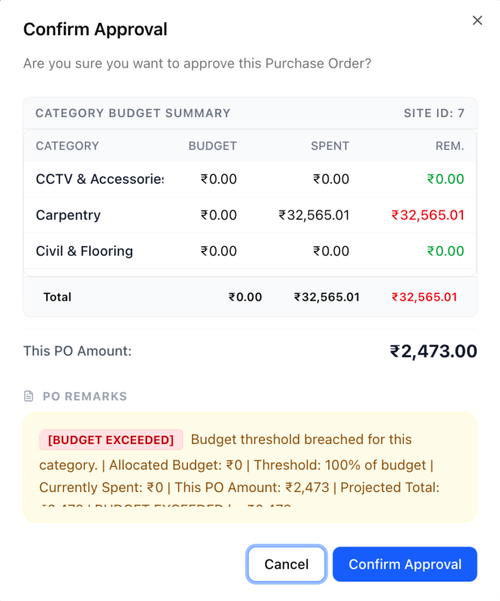
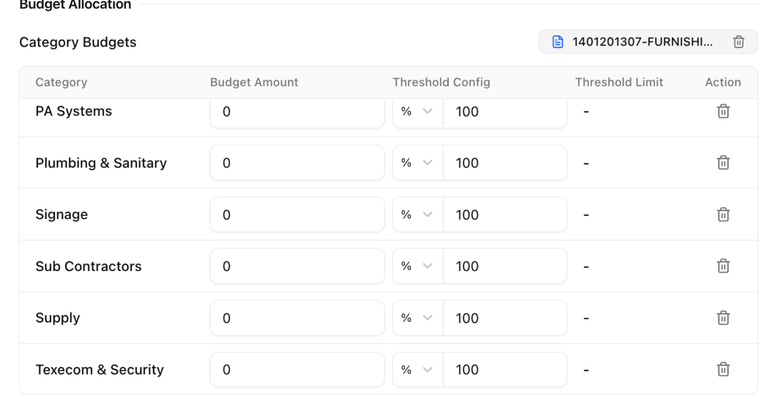
Before issuing the PO, check it against the BOQ budget for that item. In Flutebyte’s procurement module, each site has category budgets with a threshold, and a PO that would breach the budget is flagged before approval:
12Connecting the BOQ to cost tracking
The BOQ is also the yardstick for cost. Compare each item’s budget (BOQ quantity × budget rate) with actual cost (actual quantity × actual rate) as purchase orders and bills come in, not at project closure.
Illustrative example. Figures are not actual client data or current market quotations.
| Quantity | Rate | Cost | |
|---|---|---|---|
| Budget (approved BOQ) | 100 | ₹1,200 | ₹1,20,000 |
| Actual (purchase) | 100 | ₹1,350 | ₹1,35,000 |
| Variance | ₹15,000 (12.5%) |
Budget vs actual cost
₹, one item, 100 units. Illustrative data.
Overrun against baseline = ₹15,000 ÷ ₹1,20,000 × 100 = 12.5%
Here quantity held and the rate moved. On real projects, quantity changes, taxes, wastage, freight and labour create further differences, and each needs its own line in the variance report. Only then can you tell a buying problem from a scope problem. Our piece on the missing link between BOQ, purchase, site and accounts covers the reporting side.
13Illustrative project walkthrough
This is an illustrative walkthrough, not a Flutebyte customer case study. The company, project and numbers are invented to show how the steps above connect. We will publish verified client case studies only with the client’s permission and recorded data.
A turnkey contractor wins the 85 sqm office above at the v1.0 tender value of ₹6,51,828.80 before GST.
Week 3: client variation
The client asks for an additional 8.4 sqm of glass partition for a second meeting room. The site engineer logs a change request instead of agreeing verbally. The estimator prices it at the existing BOQ rate for item A2: 8.4 × ₹3,450 = ₹28,980.00. The client approves VO-01 and the BOQ moves to v2.0 at ₹6,80,808.80. Version 1.0 stays on file.
Contract value by BOQ version
₹, excluding GST. Hypothetical data.
Week 4: procurement rate change
The flooring supplier’s rate for item C1 rises from ₹1,150 to ₹1,290 per sqm. This is a cost change, not a client variation, so the contract value does not move. Because the PO is checked against the BOQ budget, the ₹11,900 increase (₹97,750 budget vs ₹1,09,650 actual) is flagged at approval. The contractor can negotiate, choose an approved equivalent, or accept it knowingly, instead of discovering it at final accounts.
What the walkthrough shows
- The client-driven change was billed, because it went through a variation and a new BOQ version.
- The supplier-driven change was seen early, because each PO was checked against its BOQ line.
- Both depended on stable item codes linking BOQ, PO and bill.
14Excel vs BOQ software
Excel is a reasonable place to start, and the template below is built in it. The question is when it stops being enough. A fair comparison:
| Need | Excel / Google Sheets | BOQ / interior ERP software |
|---|---|---|
| Preparing and pricing one BOQ | Works well; flexible and familiar | Works; more structure, less freedom |
| Cost to start | Usually already owned | Licence or build cost plus setup time |
| Version history and approvals | Manual: file copies and a log sheet | Built in, with who changed what and when |
| Multiple people editing | Risk of overwritten cells and broken formulas | Role-based permissions |
| Checking POs against BOQ budget | Manual lookups, usually after the fact | Checked at PO approval |
| RA billing against BOQ quantities | Separate workbooks per bill | Cumulative quantities carried forward |
| Portfolio view across many projects | Hard; needs consolidation work | Reports across projects |
| Fit to your own workflow | Fully flexible | Depends on the product; custom-built systems fit closely, off-the-shelf tools less so |
A common rule of thumb: once more than one person edits the BOQ, or once purchase and accounts start keeping their own copies of it, the spreadsheet is no longer the single source of truth.
15Download the Excel template
Five sheets: BOQ with unit and category drop-downs, auto amounts and GST; category summary; measurement sheet; rate analysis; revision log. Pre-filled with the illustrative rows from this guide. Free, no sign-up.
Replace the sample rows with your own items and rates, and check the GST cell against your contract before using totals.
Need BOQ approvals, revisions and procurement connected in one system?
Flutebyte builds interior project software around your own workflow: BOQ versions and variations, RFQ to PO, site GRN, RA billing with retention, and Tally or Zoho Books sync. Your company owns the code, and most implementations go live in 8 to 12 weeks, delivered in phases.
Or explore the full interior project management suite, or estimate a build with the software cost calculator.
16Common questions
Who prepares the BOQ in an interior project?
In a tendered project, the client’s quantity surveyor or PMC usually prepares it and contractors price it. In design-and-build and turnkey work, the contractor’s estimator prepares it from their own design, and the client or their consultant reviews it.
What is the difference between a BOQ and an estimate?
An estimate can be a single figure or a rough per-sqft cost. A BOQ itemises the work with quantities and rates, so it can be checked, compared between bidders and used for billing.
What is the difference between a BOQ and a BOM?
A BOQ lists finished work items the client pays for, such as sqm of partition. A BOM lists the materials needed to build each item, such as boards, studs and screws, and is used by purchase and production.
Should wastage be included in BOQ quantities?
Usually not. Quantities are normally measured net from drawings, and wastage is allowed for in the rate. Check your contract’s measurement rules, because some private contracts handle this differently.
Should the BOQ be in sqft or sqm?
Either works if it is used consistently and stated in the preamble. Indian residential interiors often use sqft; commercial fit-out BOQs in India and the GCC often use sqm.
How do I handle a client change after the BOQ is approved?
Log the change, price it as a variation using existing BOQ rates where items are similar, get written approval, then issue a new BOQ version. Do not overwrite the approved version, and do not purchase for the change before approval.