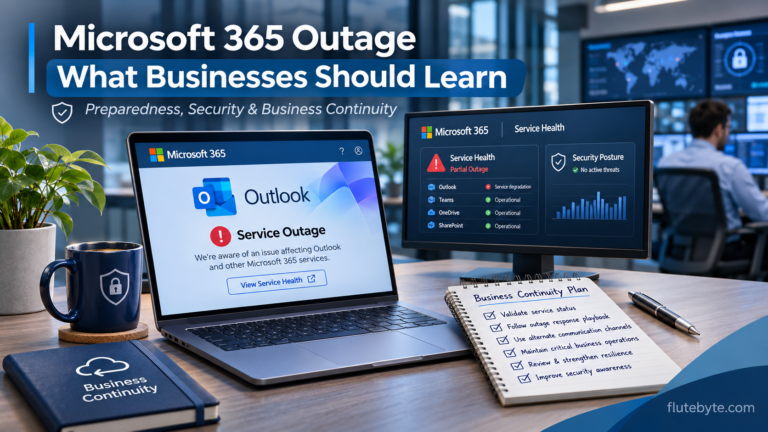

On Thursday, 12 November 2026, Microsoft experienced a technical failure. Within hours, its impact was being felt across 74 countries and territories.
Outlook users couldn’t access their mailboxes. Businesses struggled to communicate. Hospitals, government offices, courts, and other organisations reported disruptions.
But the most interesting part wasn’t simply that Microsoft’s services went down.
It was what happened when engineers tried to bring the servers back online.
The servers initially appeared healthy. Then, as users started reconnecting, some became unresponsive again.
Why would a service with enormous computing resources and backup infrastructure struggle to recover from a server failure?
To understand that, we need to look at how Microsoft 365 works behind the scenes.
1. The Problem Started with Exchange Online
Most people think of Outlook as an email application. But Outlook is primarily how users access their emails.
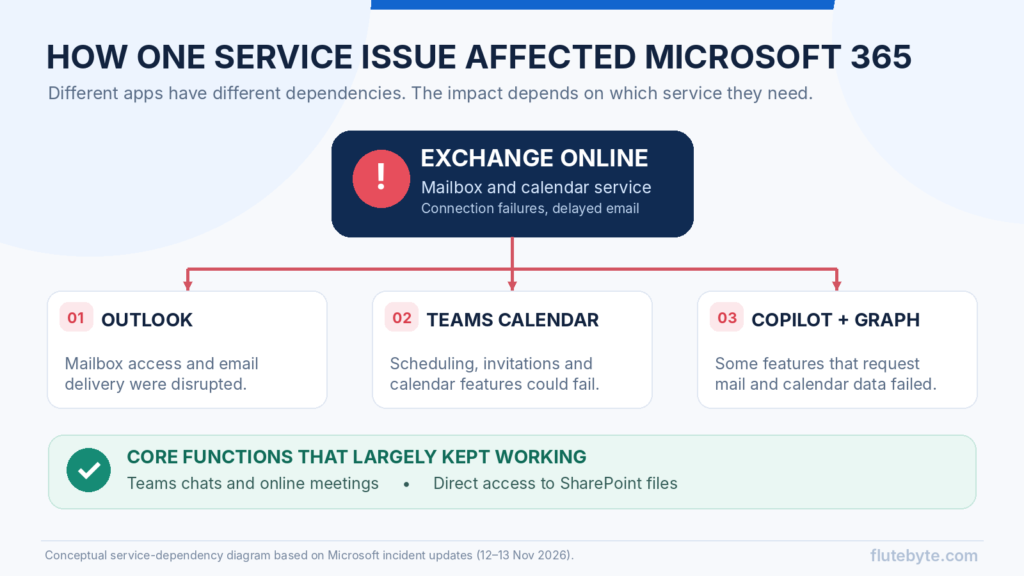
For Microsoft 365 business accounts, the actual mailbox is hosted through Exchange Online, Microsoft’s cloud-based email service.
When you open Outlook, the application connects to Microsoft’s infrastructure to retrieve emails, synchronise messages, and update your calendar.
During the November outage, a large number of servers responsible for handling these connections became unavailable.
And the problem extended beyond email.
Microsoft Teams, SharePoint, OneDrive, Copilot, and several administration tools operate as different applications, but some of their features depend on shared Microsoft 365 services.
When Exchange Online started experiencing problems:
- Outlook users struggled to access emails.
- Teams calendars and meeting scheduling were affected.
- Copilot experienced problems accessing emails and other work data.
- Some security and administration tools became difficult to access.
Importantly, not everything stopped. Core Teams messaging and meetings largely remained available, and files stored directly in SharePoint could still be accessed.
The disruption primarily affected functions relying on the troubled infrastructure.
2. Why Did One Company’s Problem Affect So Many Organisations?
Twenty years ago, many businesses operated their own email servers. A failure generally affected the organisation running that system.
Today, companies, schools, hospitals, and government departments often purchase these services from cloud providers.
This approach offers significant advantages. Organisations can access infrastructure, security, and maintenance capabilities without operating everything themselves.
However, many customers also depend on the same underlying technology.
This is known as multi-tenant cloud architecture, where multiple customers use a provider’s shared infrastructure while their data and accounts remain logically separated.
When a common service experiences a serious problem, multiple organisations can be affected simultaneously.
Cloud infrastructure is highly efficient, but shared dependencies can increase the scale of certain failures.
3. What Actually Happened Inside Microsoft’s Servers?
Here’s where the technical explanation becomes important.
Microsoft doesn’t serve millions of Outlook users through one computer. It operates large groups of servers distributed across its infrastructure.
A system called a load balancer distributes incoming requests among available servers.
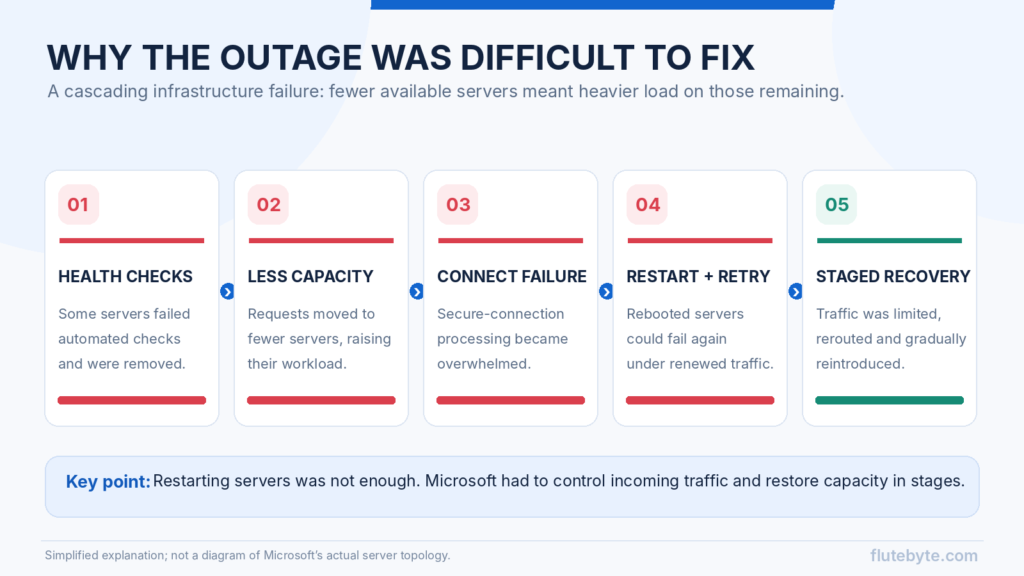
The infrastructure also performs automated health checks to determine whether individual servers are responding correctly.
If a server fails those checks, the system can stop directing requests to it.
Normally, this protects users from unreliable infrastructure.
But during the outage, many servers started failing their health checks and became unavailable.
Their workload shifted to the remaining servers.
As more servers became unavailable, the surviving infrastructure had to process increasingly heavy workloads.
Microsoft specifically reported that the elevated load was caused by unexpected server unavailability, rather than a general increase in user traffic.
Engineers describe this type of chain reaction as a cascading failure.
And it explains why the outage became so difficult to control.
4. Secure Connections Became Another Problem
Microsoft’s investigation identified another important technical issue.
A process responsible for establishing secure connections was becoming overwhelmed.
Whenever Outlook communicates with Microsoft’s servers, it needs an encrypted connection to protect information during transmission.
Setting up that connection requires processing resources.
When millions of devices connect throughout the day, the infrastructure must handle a large volume of these operations.
Now consider what happens when fewer servers are available to process those requests.
The remaining servers must handle additional connection attempts, placing more pressure on the components responsible for establishing secure connections.
This can increase response times, cause connection failures, and contribute to further server instability.
5. Why Didn’t Restarting the Servers Fix Everything?
Microsoft engineers restarted affected servers, and some initially appeared to recover.
But when traffic returned, certain servers became unresponsive again.
One possible contributor in situations like this is a reconnection surge, sometimes called a thundering herd.
When an application loses its connection, it usually retries automatically.
Now imagine millions of Outlook installations, mobile applications, calendar services, and automated systems repeatedly attempting to reconnect.
As servers return, a large number of connection requests may arrive together.
Even applications that use sensible retry intervals can collectively create substantial demand.
This helps explain why simply restarting infrastructure may not provide lasting recovery.
Microsoft responded by rerouting connections, restricting certain types of traffic, isolating affected systems, testing older configurations, and gradually returning servers to service.
Restoring capacity carefully was necessary to avoid placing too much pressure on recovering infrastructure.
6. But Doesn’t Microsoft Have Backup Servers?
It does. Cloud platforms use redundancy to reduce the impact of hardware failures and local infrastructure problems.
If an individual server fails, other systems may continue processing requests.
However, redundancy has limitations.
If multiple systems depend on the same faulty configuration or software behaviour, additional servers may encounter similar problems.
Engineers call this a correlated failure.
The risk becomes especially important when automated tools distribute software updates or configuration changes across large environments.
Automation makes it possible to maintain thousands of servers efficiently, but a problematic change can also reach many systems.
For this reason, cloud providers use staged deployments, testing, monitoring, and rollback procedures to limit how widely a faulty change can spread.
So, what caused the November 2026 outage?
Microsoft has now stated that the incident involved an issue introduced during an earlier network capacity upgrade, which surfaced following a recent network change.
The company says it has addressed the underlying issue and is restoring services to the remaining affected customers and regions.
A detailed post-incident report is still expected.
7. Was This a Cyberattack?
Microsoft has explicitly stated that the November outage was a technical issue and was not related to a cyberattack or AI agents.
Similar large-scale incidents have occurred before without malicious activity.
In July 2024, a faulty CrowdStrike software update caused widespread Windows system failures.
In October 2025, Amazon Web Services experienced a major disruption involving automated DNS management. Microsoft also experienced an Azure Front Door outage related to a configuration change that month.
These incidents involved different technologies, but they demonstrate how software and infrastructure changes can have consequences far beyond the systems where they originate.
8. What Should Businesses Learn from This?
The answer isn’t necessarily to stop using Microsoft 365 or move everything away from the cloud.
Cloud platforms remain practical and reliable choices for many businesses.
However, organisations should consider how they would continue operating during a temporary outage.
A few measures can make a real difference:
Maintain independent communication channels. Keep emergency contact numbers and an approved alternative messaging platform available outside your primary email system.
Know your software dependencies. Identify which ERP, CRM, billing, and operational processes rely on the same cloud provider or connected services.
Keep recoverable copies of critical data. Backups and restoration testing help protect against data-loss incidents, even though backups alone won’t restore an unavailable cloud service.
Plan temporary working procedures. If your ERP or email becomes inaccessible, employees should know how to record urgent transactions and reconcile them after recovery.
Review deployment and recovery practices. For custom software, ask about monitoring, staged updates, rollback plans, server capacity, and recovery testing.
Using several cloud providers may reduce certain risks, but it also introduces additional cost and complexity. For many businesses, a well-tested continuity plan is the more practical starting point.
Final Thoughts
The Microsoft 365 outage revealed something important about modern technology.
An email application may look simple, but behind it are interconnected services, automated systems, security components, and thousands of servers working together.
When a common component fails, the consequences can spread quickly. Restoring it may require much more than restarting a few machines.
For businesses, the lesson is clear: understand the technology your operations depend on and prepare for situations when it becomes temporarily unavailable.
At Flutebyte Technologies, we develop custom ERP systems, CRM solutions, websites, and business applications. We believe reliable software begins with understanding operational requirements, technical dependencies, and recovery needs.
Planning a custom business application? Visit flutebyte.com to discuss your requirements.
Technical information based on Microsoft’s November 2026 service updates. The broader explanation follows the video “Microsoft Just Went DOWN. Here’s Why.” by The World Backstage, with additional verification from published incident reports.