Businesses often start with Tally for accounting, taxation, inventory management, invoicing, and financial reporting.
Table of Contents
As operations become larger, requirements can expand into areas such as:
- Procurement
- Manufacturing
- Production planning
- Warehouse management
- Quality control
- CRM
- HRMS
- Approval workflows
- Customer portals
- Vendor portals
- Business intelligence
- Mobile applications
- API integrations
At this stage, companies frequently start discussing databases such as PostgreSQL.
This can create the impression that a business must choose between Tally and PostgreSQL.
The comparison requires more context.
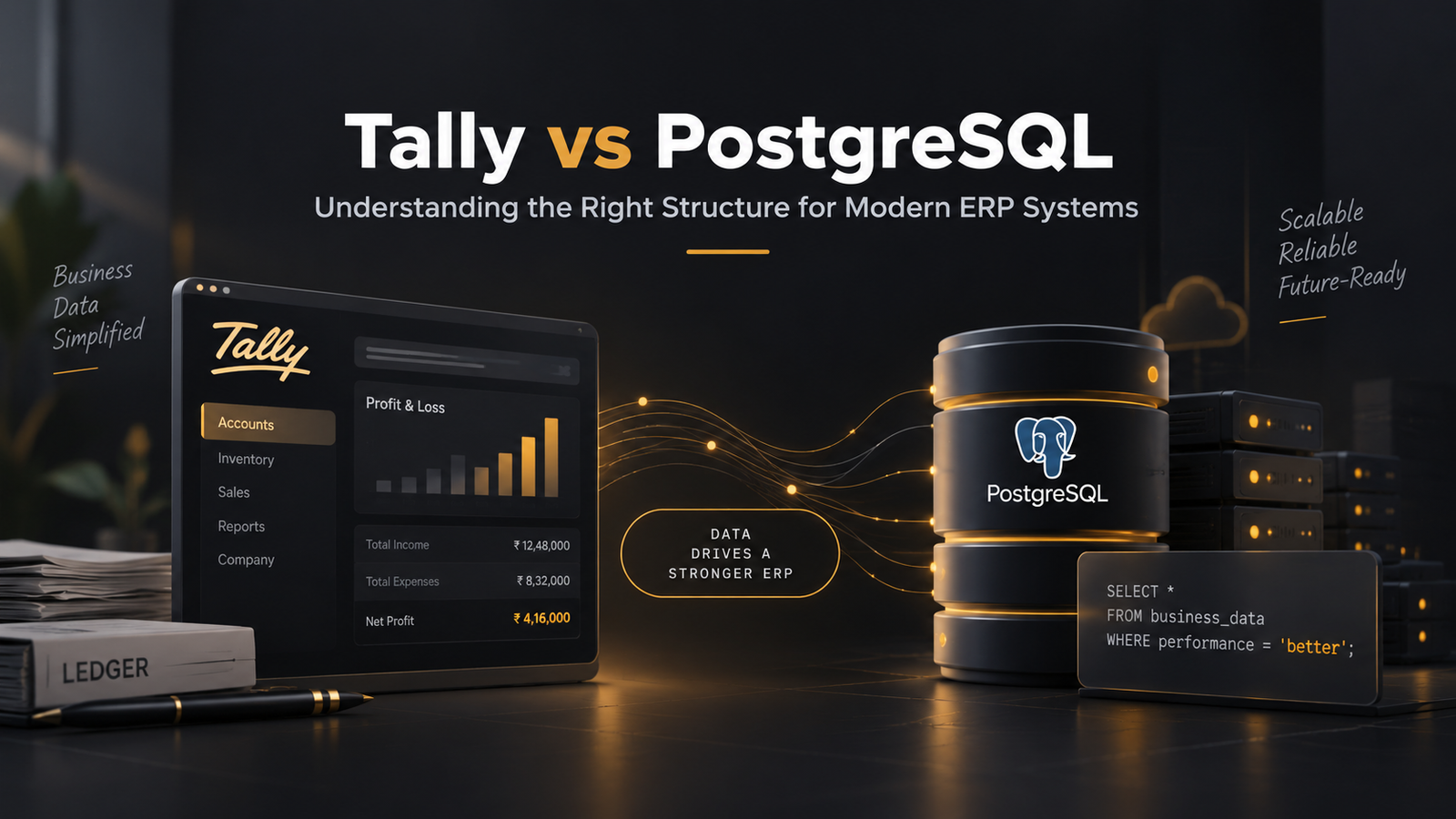
TallyPrime is an application used for business and accounting operations. PostgreSQL is a relational database management system that developers can use underneath custom business software.
In many ERP projects, the practical architecture can actually use both.
For example:
Custom ERP → PostgreSQL → Tally Integration
The ERP handles operational processes while Tally continues to handle accounting where required.
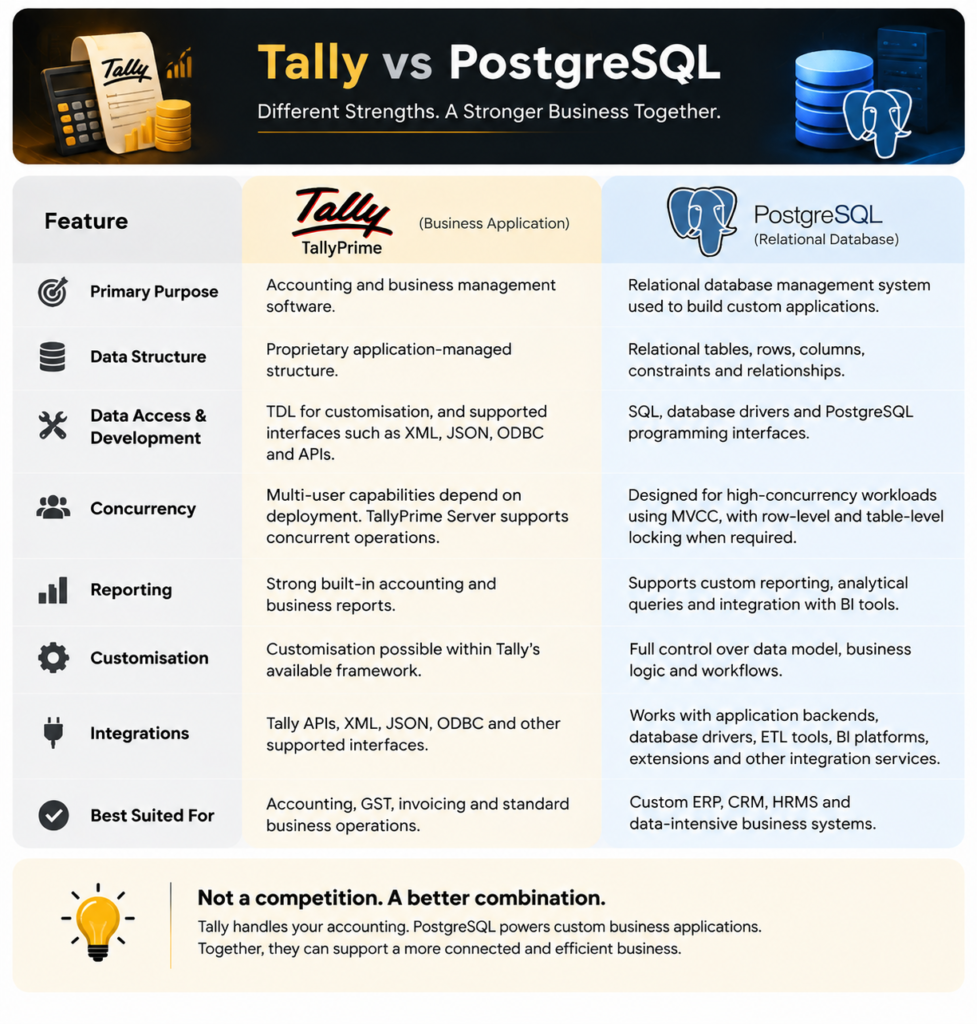
Tally and PostgreSQL at a Glance
| Area | Tally | PostgreSQL |
|---|---|---|
| Primary purpose | Accounting and business management software | Relational database management system |
| Data structure | Proprietary application-managed structure | Relational tables, rows, columns, constraints and relationships |
| Application development | Primarily within the Tally environment | Can support fully custom ERP, CRM, HRMS and other applications |
| Query language | Tally-specific mechanisms, TDL, ODBC and APIs depending on requirement | SQL |
| Multi-user operation | Supported, with capabilities depending on deployment and TallyPrime Server | Designed for concurrent database workloads |
| Reporting | Strong built-in accounting and business reports | Developers can create custom reporting structures and analytical queries |
| Integrations | Tally APIs, XML, ODBC and other available interfaces | REST APIs, application frameworks, BI platforms, ETL systems and other integrations |
| Custom workflow | Possible within Tally’s available customisation framework | Application developers control the complete workflow |
| Data relationships | Managed according to Tally’s architecture | Developers explicitly define relational data models |
| Best suited for | Accounting and standard business operations | Custom applications and data-intensive business systems |
Tally itself recommends different deployment approaches depending on business size. Its documentation describes shared data-folder deployments as suitable for smaller organisations and TallyPrime Server as an option for businesses requiring greater concurrent access, administration and performance.
1. Data Storage and Retrieval
One major architectural difference is how developers interact with the underlying data.
With PostgreSQL, an application developer can explicitly create:
Customers
    ↓
Sales Orders
    ↓
Invoices
    ↓
Payments
Each entity can exist as a table with defined relationships.
For example:
customer_id
order_id
product_id
quantity
price
status
created_at
Developers can then query exactly what the application requires.
SELECT *
FROM sales_orders
WHERE customer_id = 105
AND status = 'Pending';
PostgreSQL’s query planner determines how to retrieve this information efficiently. It may use an index or choose another execution strategy depending on factors such as table size, query conditions and data distribution.
PostgreSQL supports several indexing methods, including B-tree indexes, which are commonly used for frequently searched values.
Tally manages data according to its own application architecture rather than exposing the business database as a conventional relational schema that an ERP developer can freely redesign.
That difference becomes important when building heavily customised software.
2. Multi-User and Concurrent Operations
Consider a manufacturing company where, at 11:00 AM:
- Procurement creates a purchase order.
- Security creates a gate entry.
- The weighbridge records vehicle weight.
- QC records test results.
- Stores creates a GRN.
- Production records material consumption.
- Accounts checks pending payments.
- Management opens a dashboard.
A modern ERP may have dozens or hundreds of transactions occurring around the same time.
PostgreSQL uses Multiversion Concurrency Control, or MVCC, to manage concurrent database activity.
MVCC allows database sessions to work with consistent versions of data while reducing unnecessary conflicts between readers and writers. PostgreSQL documentation specifically states that ordinary reading does not block writing and writing does not block ordinary reading under its MVCC model.
PostgreSQL also provides row-level, table-level and other locking mechanisms where an application requires them.
Tally should not simply be described as incapable of concurrency.
TallyPrime Server supports multi-session processing, parallel requests and simultaneous reading and writing. Tally describes the product as intended for organisations where multiple users perform operations simultaneously.
The architectural difference is therefore more nuanced than:
Tally = single user
PostgreSQL = multi-user
That would be incorrect.
The bigger distinction is that PostgreSQL gives application developers direct control over transactions, schemas, indexes, relationships and application-level concurrency behaviour.
3. Server-Side Processing
PostgreSQL follows a client/server architecture.
The database server:
- Receives a query.
- Parses it.
- Creates an execution plan.
- Executes the query.
- Returns the resulting data to the application.
PostgreSQL’s official documentation describes this architecture directly.
Consider an ERP containing 5 million transaction records.
The application might request:
Show unpaid invoices
for Dealer A
between 1 April and 30 June
where outstanding amount exceeds ₹1,00,000.
The database server can process those conditions and return the required records.
The application does not need to download the complete transaction dataset before determining the result.
This model works well for web-based ERP systems where multiple departments access the same central database.
4. Database Relationships
Relational databases become particularly useful when business processes are interconnected.
A manufacturing ERP could contain relationships such as:
Supplier
   ↓
Purchase Order
   ↓
Material Receipt
   ↓
Quality Check
   ↓
GRN
   ↓
Inventory
   ↓
Production
   ↓
Finished Goods
   ↓
Sales Order
   ↓
Dispatch
   ↓
Invoice
PostgreSQL lets developers enforce relationships using:
- Primary keys
- Foreign keys
- Unique constraints
- Data types
- Check constraints
- Transactions
For example, a purchase_order_id stored inside a GRN can reference an actual purchase order.
This allows developers to maintain data integrity across a large ERP.
5. Reporting Requirements
Tally provides extensive standard reports related to accounting and business operations.
A custom ERP may require operational reports that extend much further.
For example, an ethanol manufacturing company might require:
Production reports
Opening Stock
+ Material Received
- Material Consumed
= Closing Stock
Procurement reports
Supplier
PO Quantity
Received Quantity
Rejected Quantity
Pending Quantity
Payment Status
Plant reports
Coal Received
Coal Consumed
Opening Balance
Closing Balance
Consumption per production unit
Management dashboards
Production today
Pending purchase orders
Material consumption
Inventory value
Sales
Outstanding payments
Plant efficiency
A PostgreSQL-backed ERP can combine data from multiple modules and generate these reports according to business requirements.
6. Integration Capabilities
Modern business software rarely operates independently.
A company may require connections with:
ERP
 ├── Tally
 ├── WhatsApp
 ├── Banking
 ├── Payment Gateway
 ├── GST Systems
 ├── CRM
 ├── Mobile App
 ├── IoT Devices
 ├── Weighbridge
 ├── Barcode Systems
 └── BI Dashboards
PostgreSQL commonly acts as the central database behind the application while APIs and integration services communicate with external systems.
Tally can remain part of this architecture.
For example:
Procurement
     ↓
Custom ERP
     ↓
PostgreSQL
     ↓
Approved Accounting Transaction
     ↓
Tally
This prevents teams from entering the same information repeatedly while allowing finance teams to continue using their accounting software.
7. What Happens as Data Grows?
Database design becomes increasingly important as transaction volume increases.
Suppose an ERP generates:
10,000 records per day
That becomes approximately:
- 300,000 records per month
- 3.65 million records per year
- 18.25 million records over five years
At this scale, developers need to think carefully about:
- Indexing
- Query optimisation
- Partitioning
- Backups
- Database monitoring
- Connection management
- Archiving
- Data retention
- Reporting architecture
- Disaster recovery
PostgreSQL provides database-level capabilities that allow development teams to design for workloads of this nature.
Actual performance still depends heavily on infrastructure, schema design, query design and application architecture. Simply selecting PostgreSQL does not automatically make software fast.
8. Should You Replace Tally With PostgreSQL?
For many businesses, replacing Tally is unnecessary.
A better system can look like this:
                    CUSTOM ERP
                        │
       ┌────────────────┼────────────────┐
       │                │                │
   Procurement      Production       Inventory
       │                │                │
       └────────────────┼────────────────┘
                        │
                   PostgreSQL
                        │
                Accounting Sync
                        │
                      Tally
Operational teams work through the ERP.
Finance continues working with Tally.
Data required for accounting can be transferred through an integration layer.
This approach can be particularly useful for manufacturing, distribution, logistics and other businesses where accounting represents only one part of the overall workflow.
Tally vs PostgreSQL: Which One Should a Business Use?
The answer depends on the requirement.
Tally may be sufficient when your primary requirements are:
- Accounting
- GST
- Invoicing
- Standard inventory
- Financial reporting
- Conventional business operations
A PostgreSQL-backed custom ERP becomes relevant when your organisation needs:
- Department-specific workflows
- Centralised operational data
- Complex approval processes
- Manufacturing workflows
- Custom dashboards
- Vendor or customer portals
- Mobile applications
- API integrations
- Large custom datasets
- Custom business rules
- Automation between departments
Many organisations can use both systems rather than treating the decision as an either/or choice.
Building ERP Systems Around Your Actual Business Process
Every organisation operates differently.
A manufacturing company’s software requirements can depend on its procurement process, plant structure, quality controls, inventory rules, production stages, dispatch process and finance workflow.
At Flutebyte Technologies Pvt. Ltd., we develop custom ERP and business software around these operational requirements.
Our systems can include modules such as:
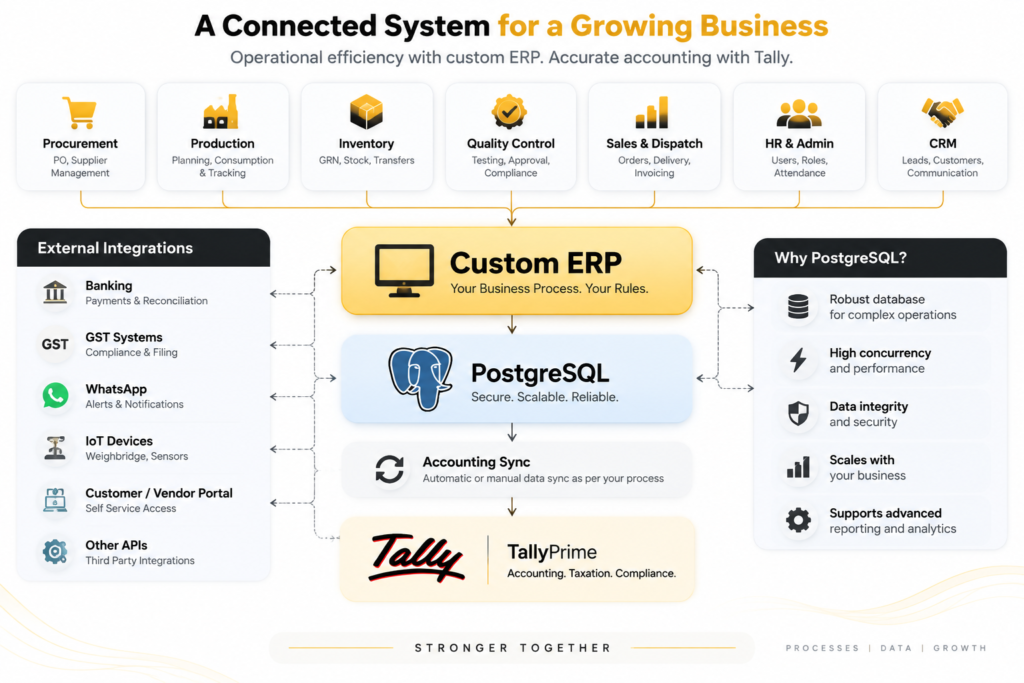
ERP • CRM • HRMS • Procurement • Inventory • Production • Quality Control • Sales • Dispatch • Finance Integrations • Tally Integration • Reporting • Management Dashboards
If your organisation currently depends heavily on spreadsheets, disconnected applications or repeated manual entries between operational software and Tally, a central ERP can help organise those processes into a controlled system.
Planning a custom ERP or Tally integration?
Talk to Flutebyte Technologies about your current workflow and software requirements.