You spent weeks negotiating with a client, finalizing quantities, and locking in the margins. The client signed the Bill of Quantities (BOQ), and the project officially started. Fast forward three months to the project closure, and your accounts team delivers bad news: the project went over budget, and your expected 20% margin has shrunk to a mere 5%.
This is a common scenario for interior contractors and turnkey project companies across the industry. As a business owner or project director, you know that the problem is rarely the initial estimation. Estimators are usually highly skilled at determining exactly what a project should cost on paper. The problem occurs in the gap between what was approved on paper and what actually happens during procurement and site execution. Managing an interior project requires strict tracking of every revision, extra purchase, and vendor bill against the baseline budget.
When you operate without a centralized system to lock the approved BOQ and link it directly to purchase orders, unauthorized spending bypasses the initial cost estimates. To protect your bottom line, you must look past the initial handshake and examine the daily operational friction that causes cost leakage.
Table of Contents
The Anatomy of Cost Leakage in Interior Projects
Cost leakage in interior projects happens when the approved project budget is disconnected from the daily operational workflow. When a project begins, the BOQ acts as the financial blueprint. However, interior projects are highly dynamic environments. Clients request changes, site conditions require material adjustments, and vendors alter prices.
If these variables are managed through disconnected Excel sheets, WhatsApp messages, and verbal instructions, the procurement team rapidly loses track of the official budget limit. They issue Purchase Orders (POs) and process Vendor Bills without verifying them against the approved BOQ line items. As a result, your company pays for the extra materials, but the client is only billed for the original BOQ. In an industry where profit margins are already tight, absorbing these unbilled costs is a direct threat to the survival of your business.
The Four Primary Drivers of Margin Loss
To fix a leaking budget, you must first understand exactly where the holes are. In most procurement-heavy interior businesses, margin loss can be traced back to four distinct operational failures.
1. Poor Version Control and the WhatsApp Trap
In a typical interior project, the design evolves even after the contract is signed. The client asks for a change, the designer updates the drawing, but the procurement team still has “BOQ_Final_v2.xlsx” instead of “BOQ_Final_v4_Approved.xlsx”. Approved BOQs are entirely useless if the procurement team buys material based on older versions or verbal instructions.
When a design changes, the material requirements change. If your purchase manager is buying laminates, hardware, or lighting based on an outdated spreadsheet attached to an email from three weeks ago, you are purchasing dead inventory. The correct materials will still need to be bought later, doubling your costs for that specific line item. Furthermore, relying on WhatsApp for design approvals creates a fragmented communication trail that is impossible for the accounts team to audit at the end of the month.
2. The “Site Emergency” and Verbal Instructions
Site execution is chaotic. Errors happen, materials are damaged, and sometimes dimensions do not match the drawings. In these high-pressure moments, a site supervisor tells the vendor to send 10 extra sheets of plywood to fix an execution error. Because the priority is to keep the project moving and avoid delaying the handover, this verbal instruction is never updated in the central budget.
These small, incremental purchases—a few boxes of screws here, an extra bucket of adhesive there—seem insignificant in the moment. However, across a three-month commercial interior project, these unrecorded site instructions aggregate into massive budget overruns. The site supervisor’s goal is project completion, not financial reconciliation, which makes a system-enforced budget limit absolutely necessary.
3. Disconnected RFQ and Purchase Order Processes
Your procurement team is responsible for buying the materials necessary to execute the project. However, buyers often do not have a system that warns them when a PO quantity exceeds the BOQ quantity.
If the BOQ accounts for 500 square feet of flooring, but the site team requisitions 600 square feet due to a miscalculation in wastage, the buyer simply raises a PO for 600. Without a strict interlock between your purchasing workflow and the approved BOQ, the buyer is blind to the financial limit. They are simply fulfilling a request, unaware that they just eroded the profit margin for that entire room. Utilizing dedicated RFQ management software can help standardize the quoting process, but it must be tied back to the BOQ to prevent these overages.
4. Unbilled Extras and Client Upgrades
Client changes during site execution often go unbilled if there is no formal revision tracking. For example, the client requests a premium laminate instead of a standard one. The purchase team buys it to keep the client happy, but the billing team forgets to raise a supplementary invoice for the price difference.
This is a failure of communication between the site, procurement, and accounts. The client receives a superior product, the vendor is paid for a premium product, and your business absorbs the cost difference. Unbilled extras are often the single largest contributor to lost profits in turnkey interior projects.
Real-World Business Scenarios
To understand the severity of this issue, let us look at practical examples that happen every day in the interior contracting industry.
Scenario A: The Office Fit-Out
Consider an office fit-out project where the approved BOQ includes 1,000 sq ft of standard glass partitions. Midway through execution, the client visits the site and requests soundproof acoustic glass for the meeting rooms instead.
The site manager agrees and sends a WhatsApp message to the purchase manager. The purchase manager orders the acoustic glass, which costs 40% more. Because there is no BOQ revision workflow, the accounts team receives the vendor bill, pays it to avoid site delays, and files it. During final billing, the client is only charged for the standard glass as per the original BOQ. The contractor absorbs the 40% cost difference, losing the margin on that entire section.
Scenario B: The Modular Kitchen Execution
A client approves a modular kitchen design based on a specific, standard finish. During the factory production phase, the client decides they want a high-gloss acrylic finish on the upper cabinets instead of a matte laminate. The designer updates the CAD drawing and emails the factory manager, and the factory manager requests the acrylic sheets from procurement.
Procurement buys the acrylic sheets. However, because the central project data was never formally updated to reflect this revision, the accounts team has no record of the upgrade. The project is installed beautifully, the client is thrilled, and your firm loses money because the acrylic sheets cost three times as much as the matte laminate, and no supplementary bill was ever generated.
The True Cost of Operating Without an Integrated ERP
When interior design companies, turnkey contractors, and modular furniture businesses attempt to scale without a unified system, the cracks in the foundation become obvious. Without a proper interior ERP software, businesses face constant operational friction.
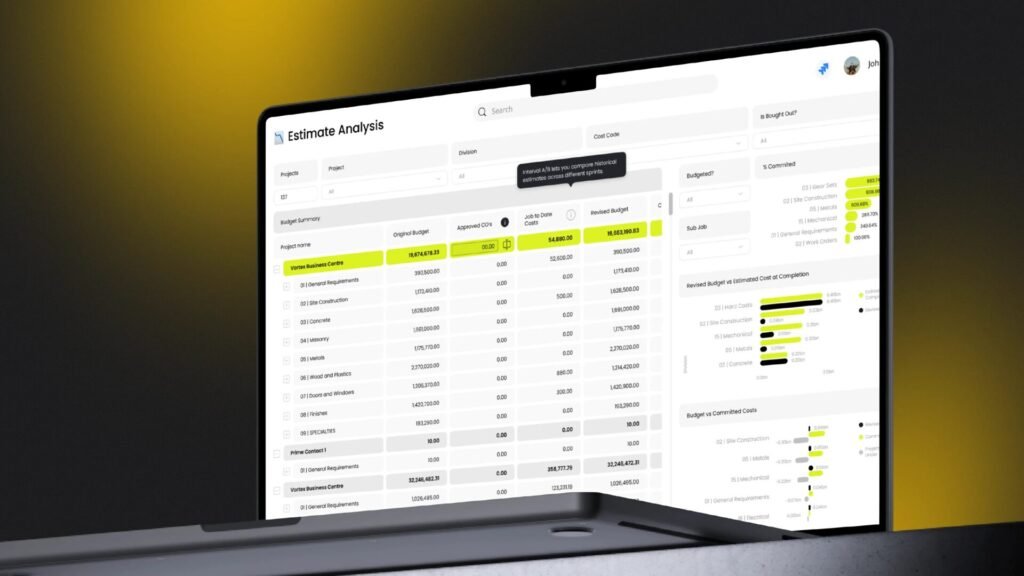
You will find your accounts team spending days on the manual reconciliation of vendor bills against project budgets, which often happens too late, long after payments are made. There are constant disputes between the site execution team, procurement team, and accounts team regarding material limits. You suffer lost revenue from unbilled client variations and extras. Most critically, management suffers from an inability to see a real-time “Budget vs. Actual” report during the project.
If you only know you lost money after the project is handed over, you are running a reactive business. True project management requires proactive control.
The Blueprint for Complete Budget Control
Stopping cost leakage requires more than just careful estimating; it requires operational discipline. Connecting your approved BOQ directly to your procurement workflow prevents over-purchasing. The proper workflow for interior project budget control follows these strict steps:
Step 1: BOQ Approval and Baseline Lock
The final BOQ is approved by the client and locked in the system. This document is no longer a draft; this becomes the baseline budget against which all future activity is measured. Once a budget is locked, any deviation must trigger a formal workflow rather than a casual conversation. Using professional BOQ management software ensures this baseline is secure and accessible only to authorized personnel.
Step 2: Formal Version Tracking
Any client-requested change triggers a BOQ Revision. The system logs Version 2 and requires approval before it becomes active. This ensures that “Version 1” remains intact for historical comparison, and procurement only ever looks at the officially approved active version. Proper versioning protects you from client disputes regarding what was originally agreed upon versus what was ultimately delivered.
Step 3: Strict Procurement Limits
The active BOQ dictates the Bill of Materials (BOM). The system prevents the creation of an RFQ or PO that exceeds the approved quantities or rates without management override. If a site supervisor asks for 10 extra sheets of plywood, the buyer physically cannot generate the PO without a project manager approving the budget deviation.
Step 4: GRN and Vendor Bill Verification
When material arrives at the site (GRN), the system matches it to the PO. The vendor bill is verified against the GRN and PO, ensuring no hidden costs slip through to the accounts payable department. This three-way matching process is the ultimate defense against vendor overcharging and internal procurement fraud.
How Flutebyte’s Interior ERP Fixes the Gap
By moving away from scattered Excel sheets and adopting a centralized system, you ensure that every rupee spent is accounted for against the approved budget. Flutebyte’s Interior ERP connects the entire lifecycle: Tender / Enquiry → Project Creation → BOQ → BOM → Budget → Procurement → RFQ → Vendor Quote Comparison → Purchase Order → GRN / QC → Inventory → Site Execution → Production → Dispatch → Billing → Reports → Project Closure.
Flutebyte’s interior ERP software is built specifically to stop cost leakage in procurement-heavy project businesses. It handles the complexities of site execution and material planning through three core mechanisms:
- Absolute Version Control: Flutebyte maintains a strict version history for every BOQ. When a client approves a change, the system archives the old BOQ and sets the new one as the active budget. This single source of truth eliminates the “WhatsApp trap”.
- Procurement Interlocks: The procurement module reads directly from the approved BOQ. If a buyer tries to raise a PO for 50 sheets of plywood when the BOQ only allows 40, the system blocks the action and flags it as an “Extra” requiring project manager approval. This shifts the responsibility of budget overruns from the accounts department at the end of the project, to the project manager during the project. Implementing specialized procurement management software that integrates with your BOQ is a non-negotiable for modern contractors.
- Live Budget vs. Actual Dashboards: Flutebyte provides live reporting. Every time a PO is raised or a vendor bill is booked, the project dashboard updates the actual cost against the estimated budget.
The Old Way vs. The Flutebyte Way
To clearly illustrate the difference between running an interior business on manual spreadsheets versus a specialized ERP, consider how core functions are handled.
- BOQ Storage: The old way relies on multiple Excel files scattered across emails. The ERP way utilizes a centralized, locked database with strict version history.
- Purchase Limits: The old way relies on manual checking, which is incredibly easy to bypass when a buyer is rushing. The ERP way enforces automated blocks if a PO exceeds the BOQ quantity.
- Client Revisions: The old way handles changes via WhatsApp, and they are often forgotten in final billing. The ERP way uses a formal BOQ revision process that is intrinsically linked to final invoicing.
- Cost Tracking: The old way treats tracking as post-project reconciliation, a purely reactive exercise. The ERP way provides a real-time Budget vs Actual dashboard, allowing you to make proactive decisions.
Final Thoughts on Protecting Your Margins
When your approved BOQ is disconnected from your daily purchases and site execution, margin loss is inevitable. You cannot rely on the diligence of individual buyers or site supervisors to remember what was in a 30-page commercial contract. You need systems that enforce the rules of the contract automatically.
If you are tired of negotiating healthy margins in the boardroom only to watch them disappear on the construction site, it is time to digitize your operations. Establish a single source of truth for your budgets, connect your purchasing directly to those budgets, and require management approval for any deviations.
Flutebyte can help you map your current BOQ, procurement, and project workflow into a custom ERP structure built around your business process. Take control of your project data, lock your baseline budgets, and ensure that your hard-earned margins actually make it to your bottom line.
Frequently Asked Questions (FAQs)
1. What is BOQ version control?
BOQ version control is the process of tracking every change made to a Bill of Quantities after its initial creation, ensuring teams always work from the most recently approved document while maintaining a history of past versions.
2. Why do interior projects go over budget?
They go over budget mainly due to unrecorded client changes, site material wastage, vendor price fluctuations, and purchasing materials beyond the approved BOQ limits.
3. How does interior ERP software control project costs?
It controls costs by linking the approved BOQ directly to the procurement and site execution modules, preventing unauthorized purchases and providing real-time cost tracking.
4. Can we track extra site materials that were not in the BOQ?
Yes, a proper ERP flags these as deviations or “extras,” requiring the project manager to either raise a supplementary bill to the client or formally absorb the cost.
5. How do client revisions affect project margins?
If client revisions require more expensive materials or more labor, and these changes are not formally added to a revised BOQ for billing, the contractor pays the difference, reducing their margin.
6. What is the difference between estimated cost and actual cost?
Estimated cost is the projected expense calculated in the BOQ before the project starts. Actual cost is the real money spent on purchase orders, labor, and vendor bills during execution.
7. How do I stop my purchase team from over-ordering?
Implement procurement management software that restricts Purchase Order generation based on the exact quantities defined in the locked BOQ. Using separate software creates data silos, so an integrated Interior ERP that connects BOQ, procurement, and accounts in one system is highly recommended.
8. Does enforcing purchase limits slow down site execution?
While it adds a layer of approval for out-of-budget items, this short pause is necessary to evaluate if the client needs to be billed for an extra or if the cost must be absorbed. It prevents massive financial losses without severely impacting timelines if managers review approvals daily.