Welcome to Flutebyte Technologies
BOQ Management Software for Interior and Turnkey Projects
Create, revise, approve, lock and track BOQs in one system so your project costing, procurement, billing and profitability stay connected.
Most interior companies manage BOQs in Excel, WhatsApp and email. Flutebyte helps you move BOQ planning into a structured ERP workflow where every approved BOQ can connect with project budget, BOM, purchase, inventory and reports.
Custom-built for interior contractors, modular furniture companies, turnkey project teams and procurement-heavy businesses.
BOQ Problems That Create Cost Leakage in Interior Projects
A BOQ may look simple in Excel, but once the project starts, small mistakes in BOQ control can affect purchase, site work, vendor billing and final project profit.
Multiple BOQ Versions
Different teams work from different files, and nobody is sure which BOQ is final.
No Clear Approval History
Management, client and project team approvals are often tracked through calls, emails or WhatsApp messages.
Purchase Based on Old BOQ
The purchase team may raise material requirements based on an outdated BOQ or old revision.
Cost Changes Are Not Tracked
Material rate changes, labour changes, hardware changes and finish changes are not properly recorded.
Budget Is Not Locked
If the approved BOQ is not connected to the project budget, budget vs actual tracking becomes weak.
Vendor Bills Become Difficult to Verify
Accounts may not know whether a vendor bill is linked to the approved BOQ, revised scope or extra work.
What Is BOQ Management Software?
BOQ management software helps your team create, import, revise, approve and lock the Bill of Quantities for every project. It gives one approved BOQ reference to the project, purchase, site, accounts and management teams.
In a custom Interior ERP, BOQ is not just a costing sheet. It becomes the base for project budget, BOM planning, procurement control, billing, vendor checks and profitability reports.
If a wardrobe BOQ line item is approved, the ERP can later connect it with material requirement, hardware requirement, purchase planning, site execution, vendor billing and budget vs actual cost.
Excel BOQ vs BOQ Management in Flutebyte ERP
How the BOQ Module Works
The BOQ workflow can be customized based on your company’s approval process. A typical workflow can follow this structure:
Project or Tender Created
The BOQ can be created against a tender, enquiry, direct work or confirmed project.
BOQ Imported or Created
Your team can create BOQ line items inside the ERP or import an approved Excel format.
Section-Wise BOQ Planning
BOQ can be divided by room, area, floor, work package, category or project stage.
Rate and Cost Calculation
Material, labour, hardware, finish, transport, site condition, risk and margin can be considered while calculating rates.
Internal Review
Project head, estimator or management can review the BOQ before sending it to the client.
Revision Handling
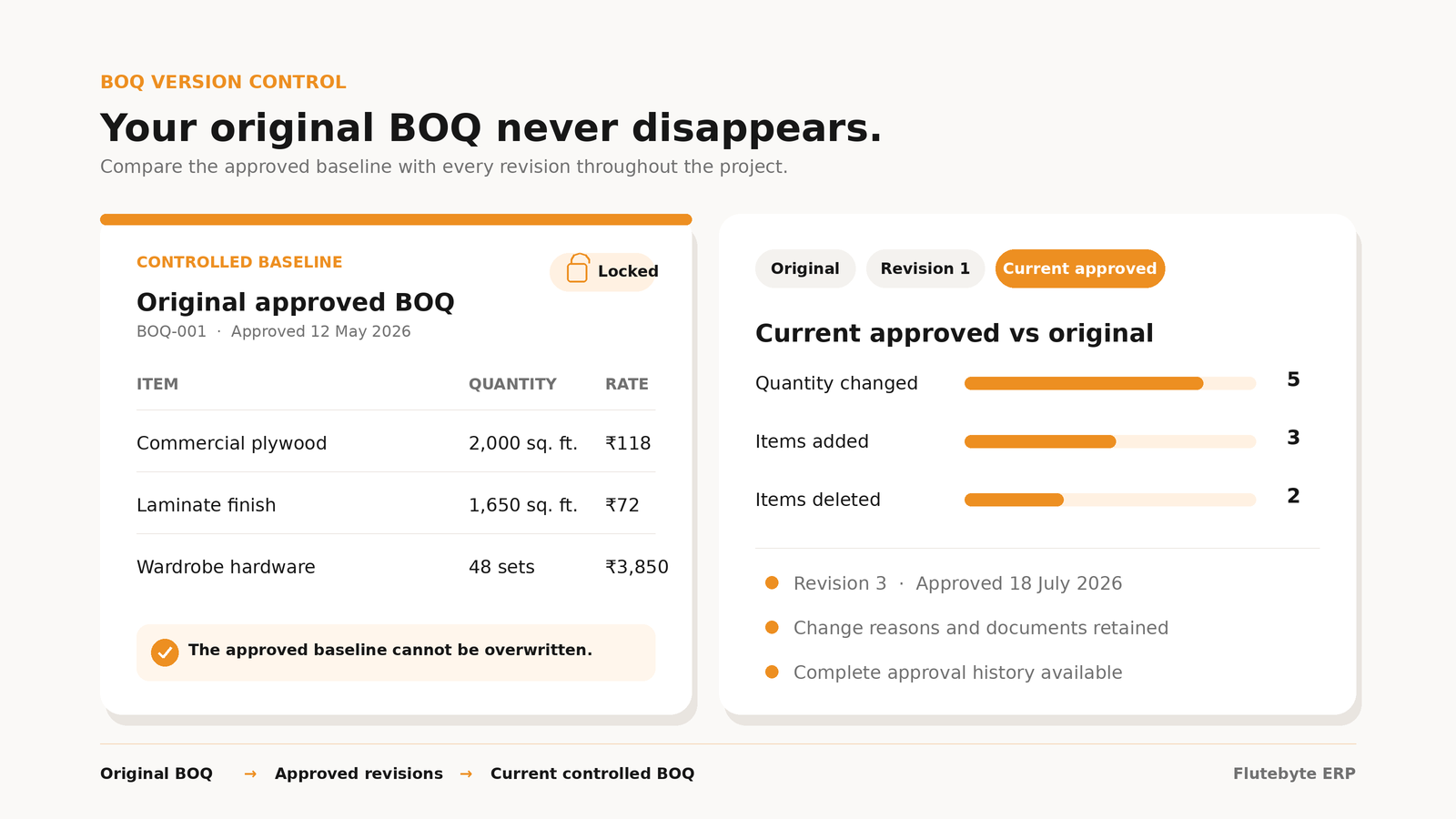
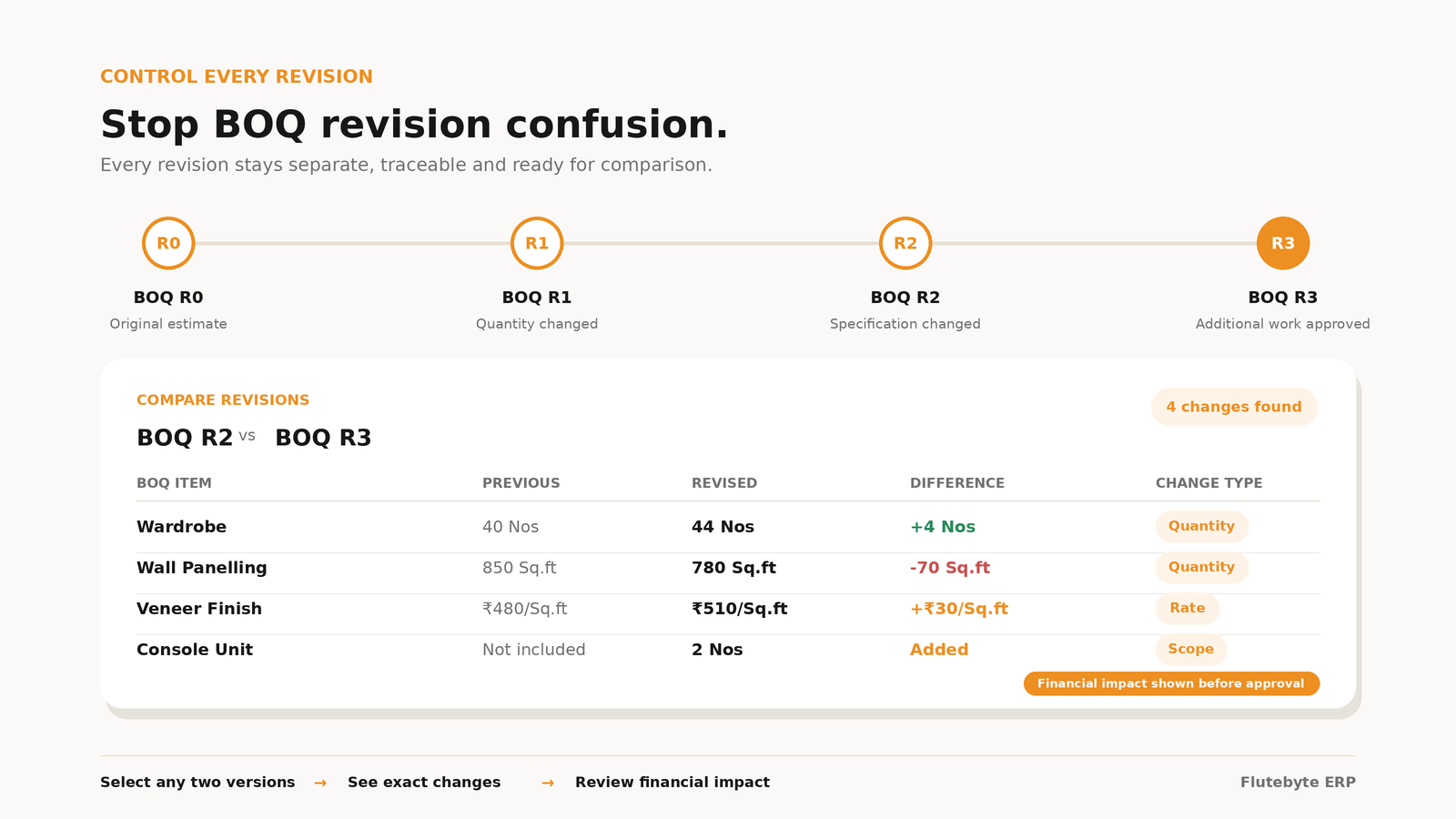
If any change is needed, a new BOQ revision can be created without deleting the old version.
Approval and Locking
Once approved, the final BOQ can be locked so purchase, budget and billing teams work from the same reference.
Connected Project Planning
The approved BOQ can connect with project budget, BOM, procurement, inventory, billing and profitability reports.
Key Features of BOQ Management Software
BOQ Import
Import BOQ from Excel or use a custom entry format based on your existing process.
Section-Wise BOQ
Manage BOQ by room, floor, project area, category, package or work type.
BOQ Line Item Library
Maintain standard BOQ items for repeated work such as wardrobe, kitchen, partition, ceiling, painting, electrical and furniture.
Smart Rate Structure
Calculate rates based on material, labour, hardware, finish, site condition, overhead and margin.
BOQ Revision Control
Create new BOQ revisions without losing old records.
Approval Workflow
Send BOQ for internal approval before client submission or project budget lock.
BOQ Locking
Lock approved BOQ so teams cannot work on outdated or unapproved versions.
Project Budget Creation
Use the approved BOQ as the base for project budget planning.
BOQ to BOM Connection
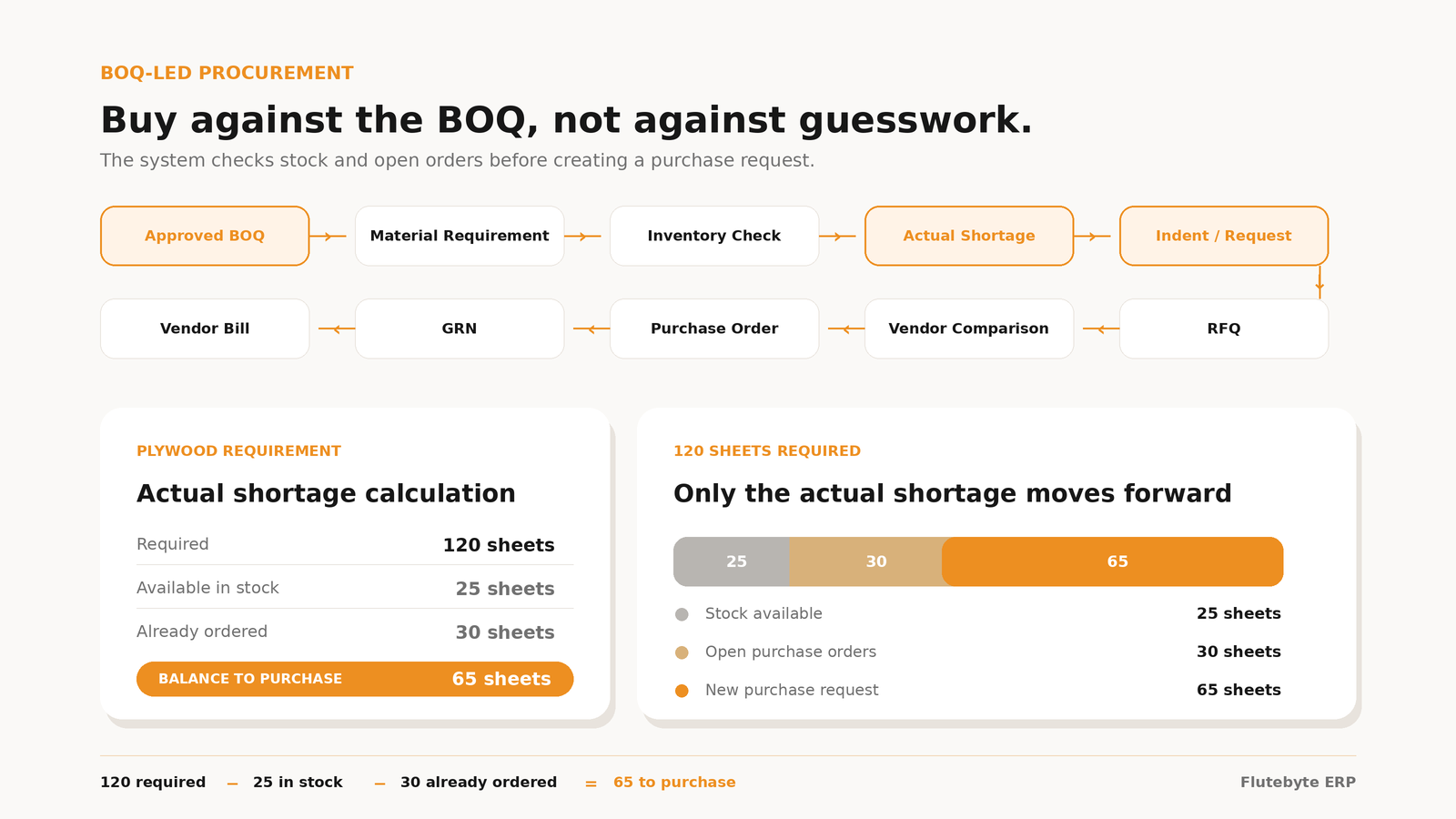
Connect approved BOQ with BOM planning, material requirement and procurement.
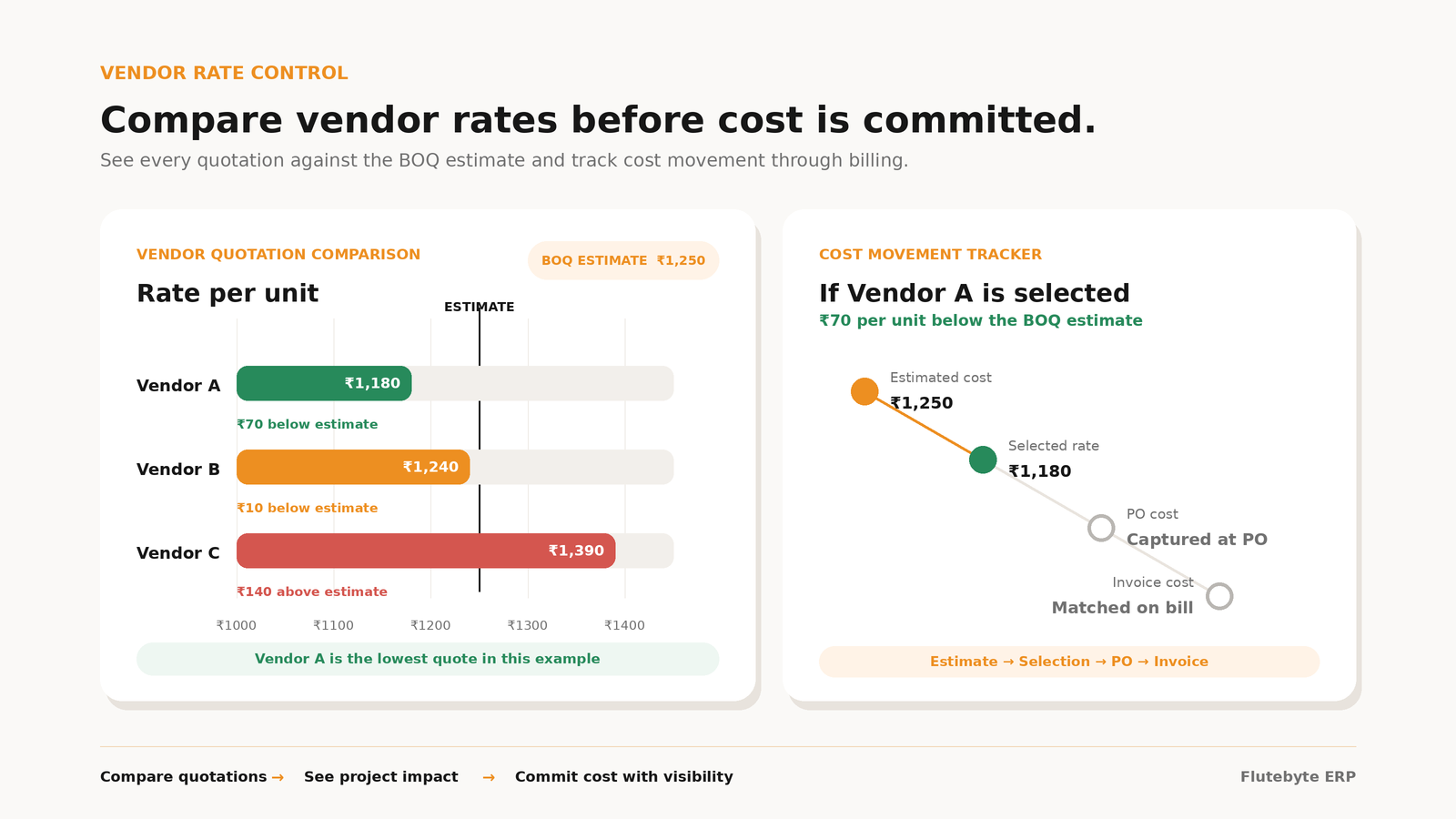
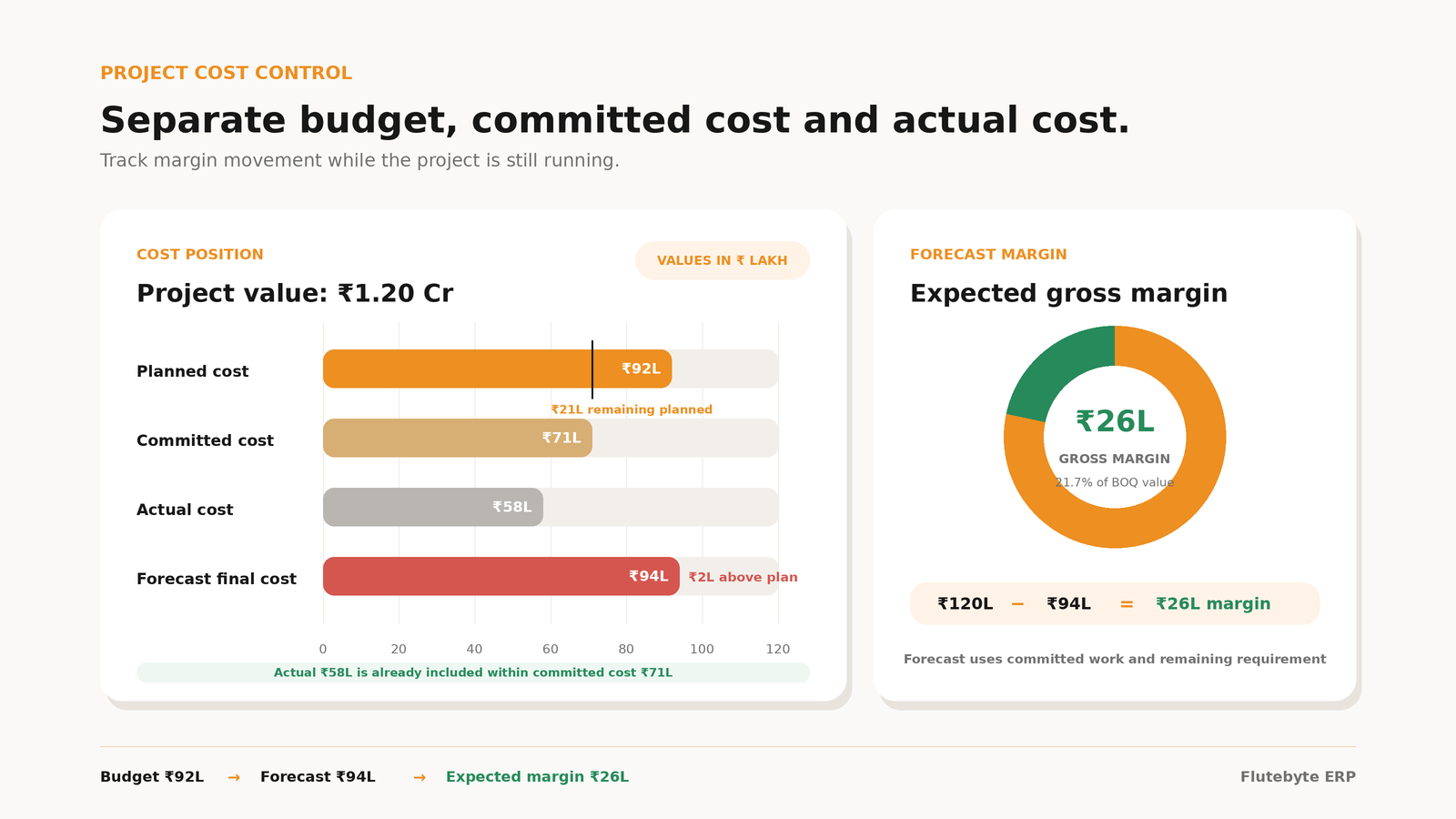
Budget vs Actual Tracking
Compare approved BOQ value with actual purchase, labour, site expense and vendor bills.
Document Attachment
Attach drawings, client approvals, revised sheets, work orders and supporting files.
Audit Trail
Track who created, changed, approved, revised or locked the BOQ.
Smart BOQ Pricing for Better Cost Control
In many interior businesses, estimators calculate BOQ rates manually. This creates dependency on individuals and increases pricing mistakes. Flutebyte builds a smart pricing workflow where the system calculates BOQ rates using approved business factors.
Calculated Pricing Factors
Aggressive Tender Mode
Use this when you want to quote competitively. You control your margin and apply approved alternate specifications to win the bid.
Balanced Margin Mode
Use this for regular projects. You apply standard material specifications, standard labour costs, and normal profit margins.
Premium Quality Mode
Use this for premium projects. You set better specifications, require higher quality materials, and charge higher margins.
BOQ Connected with Your Complete Interior ERP
A BOQ module gives better results when it is connected with other ERP modules. This avoids duplicate work and gives management better control.
Project Management
Approved BOQ becomes the base reference for the project.
BOM Management
BOQ line items can be connected with material requirement planning.
Procurement
Purchase planning can start from approved requirement, not guesswork.
Inventory
Stock availability and shortage can be checked against project requirement.
Vendor Management
Vendor cost and work orders can be compared with approved BOQ scope.
Site Execution
Site work can be tracked against approved BOQ sections and work packages.
Billing
Client billing can be linked with approved BOQ items and project milestones.
Reports
Management can view BOQ status, budget, actual cost and project profitability.
Sample BOQ Screens That Can Be Developed
Final screens can be customized based on your company’s BOQ format, approval flow and reporting needs.
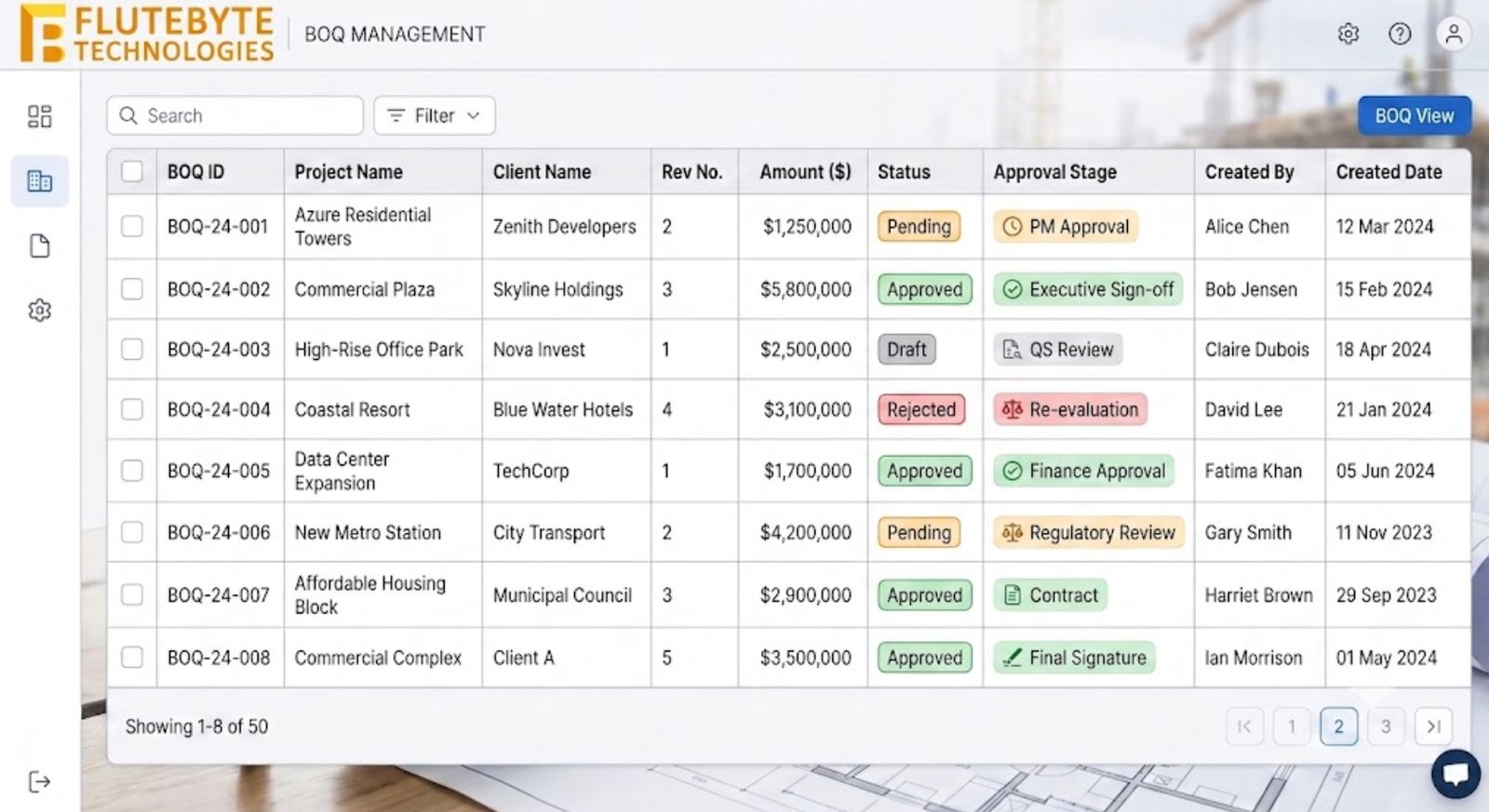
BOQ List View
Shows all BOQs with project name, client name, revision number, amount, status and approval stage.
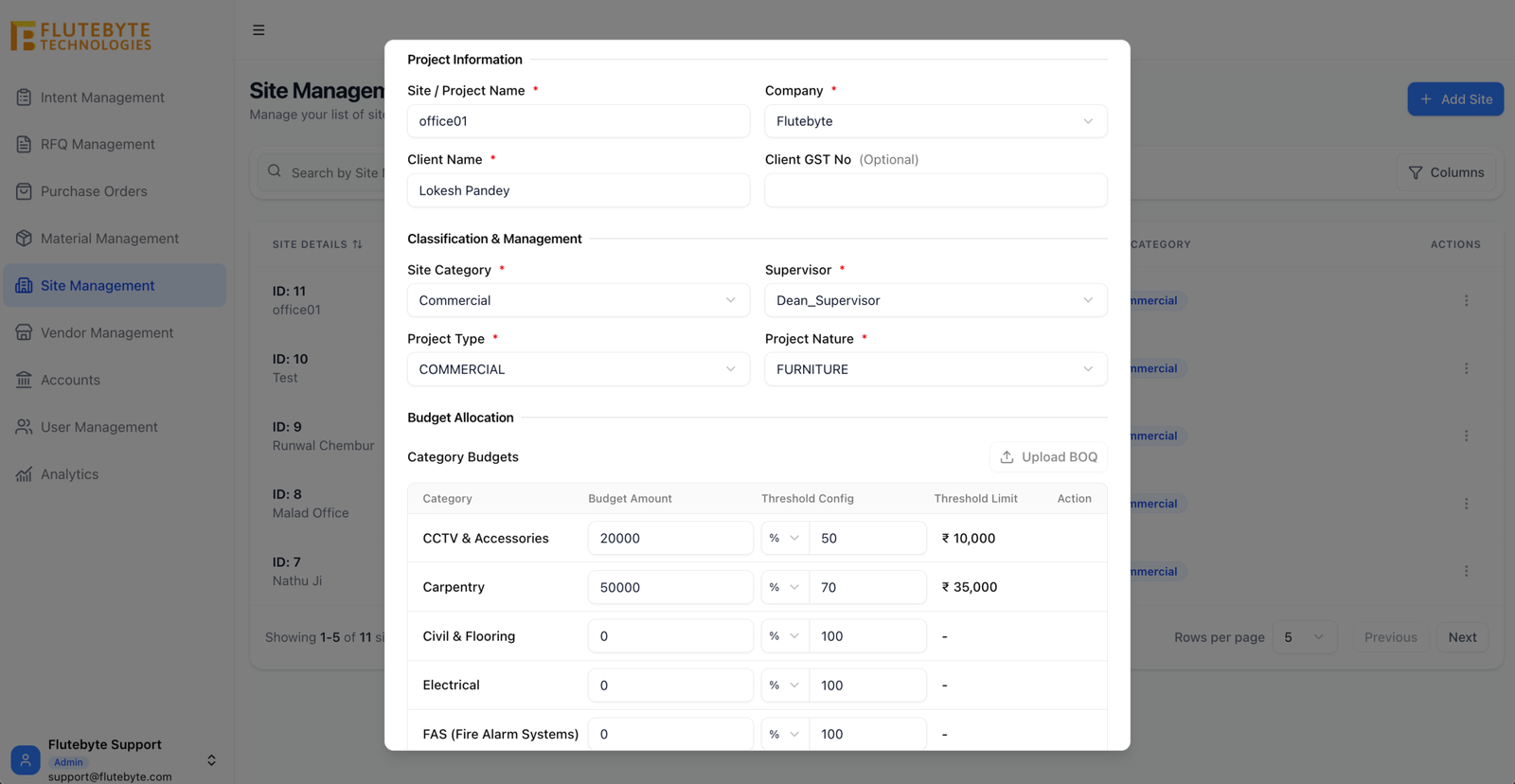
BOQ Creation Form
Allows team to add BOQ line items, quantity, unit, rate, category, remarks and attachments.
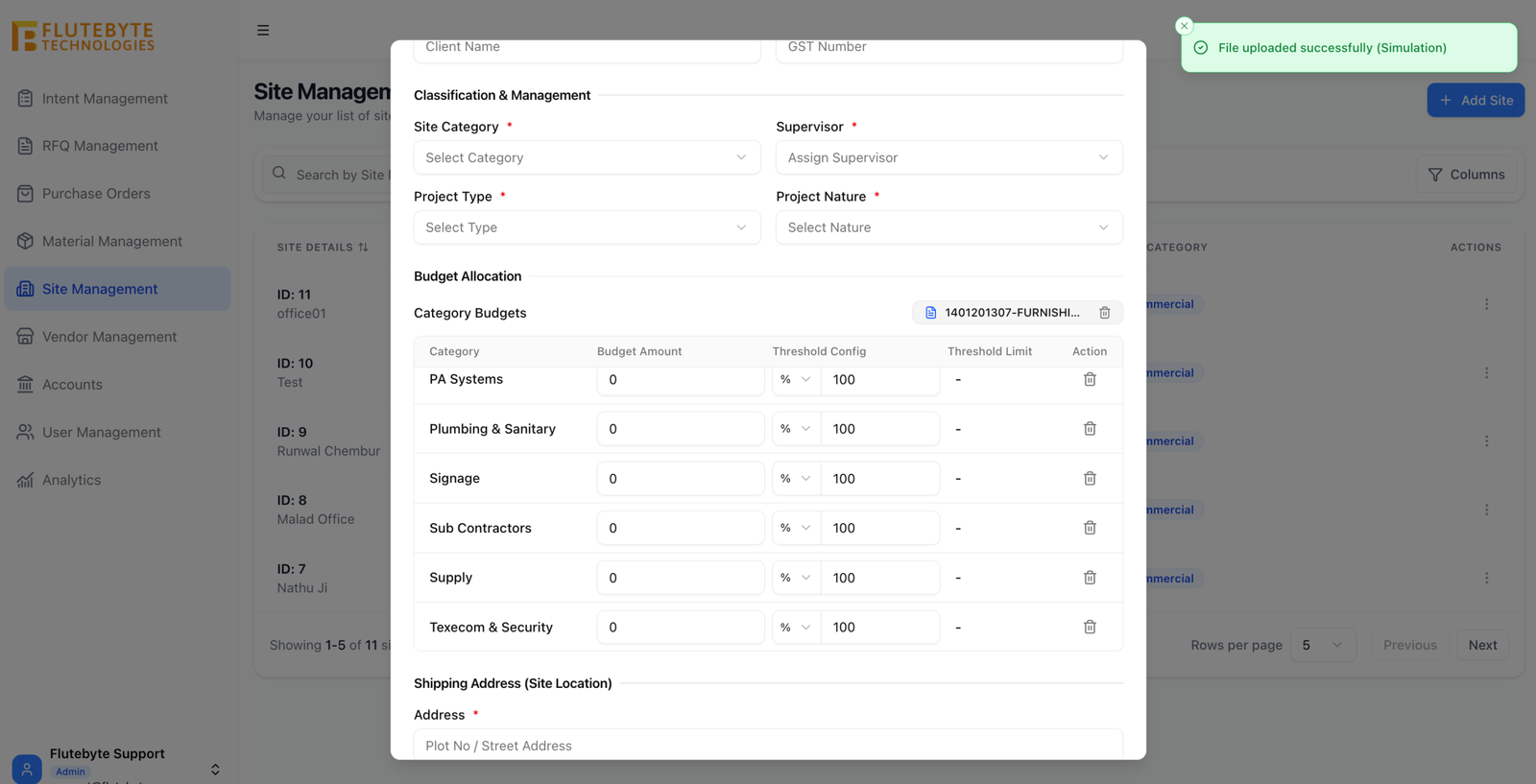
BOQ Import Screen
Allows upload of approved Excel BOQ format and maps columns into ERP fields.
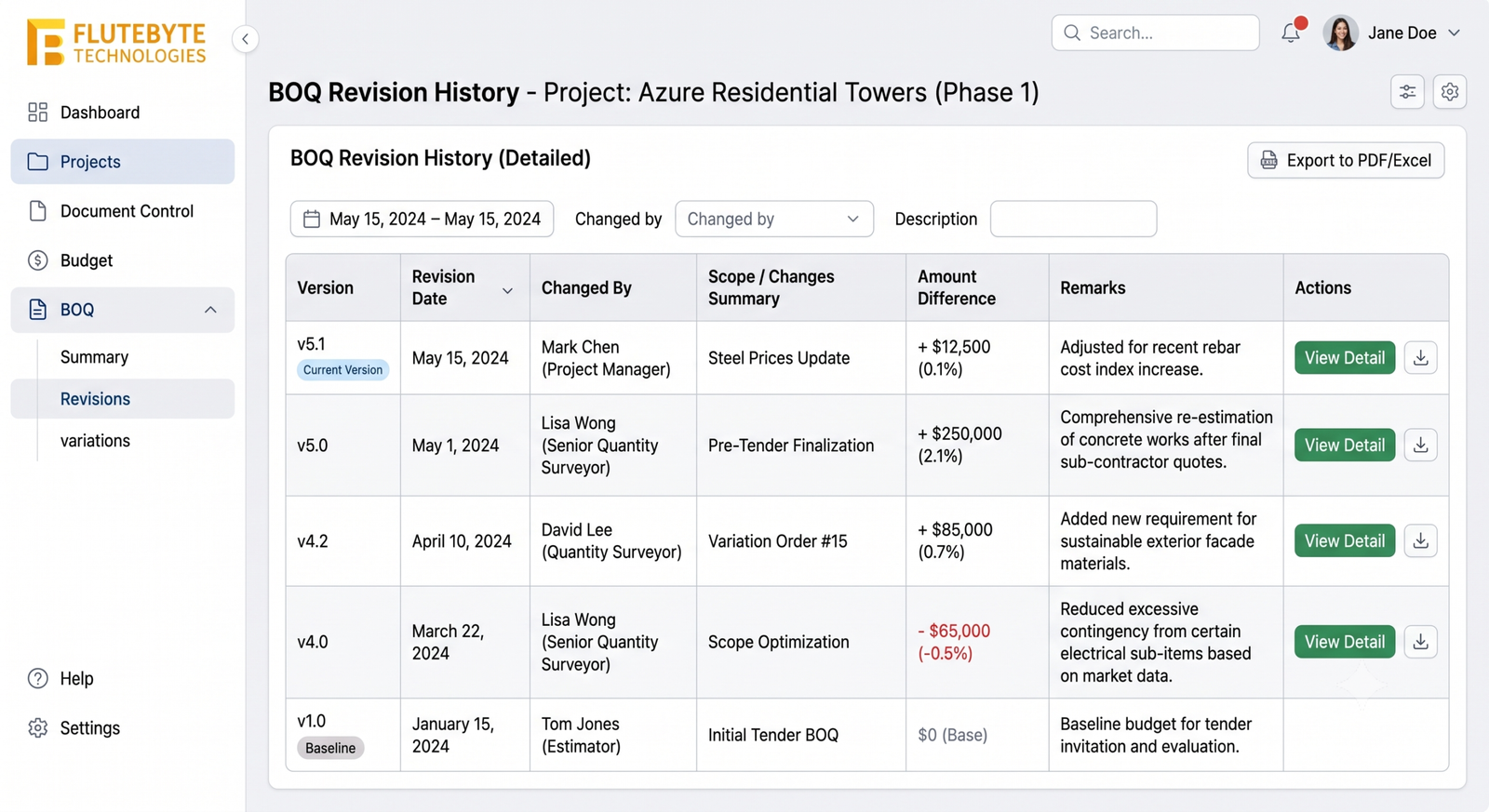
BOQ Revision History
Shows all old and current versions with date, changed by, amount difference and remarks.
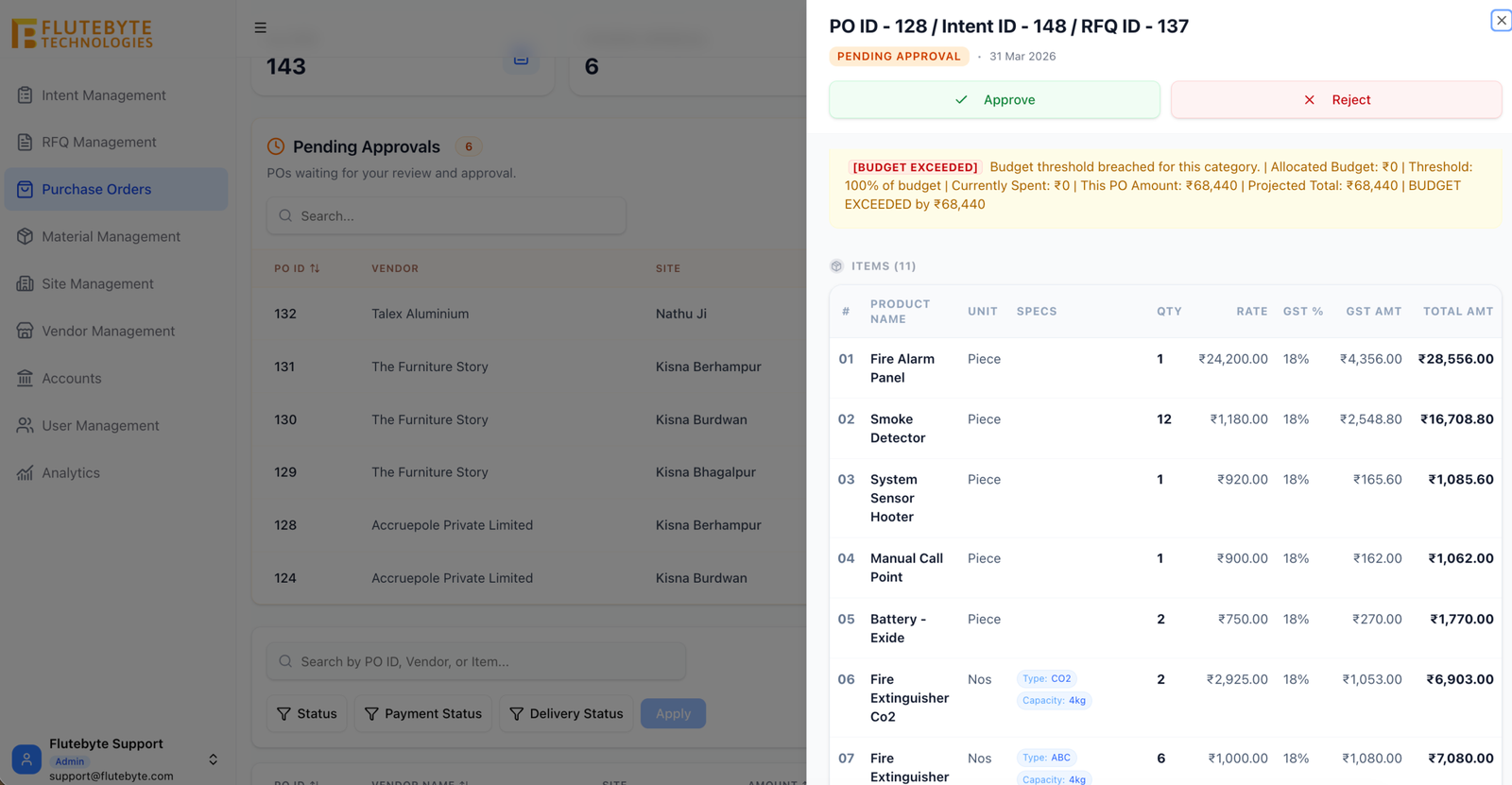
BOQ Approval Screen
Allows management or project head to approve, reject or request revision.
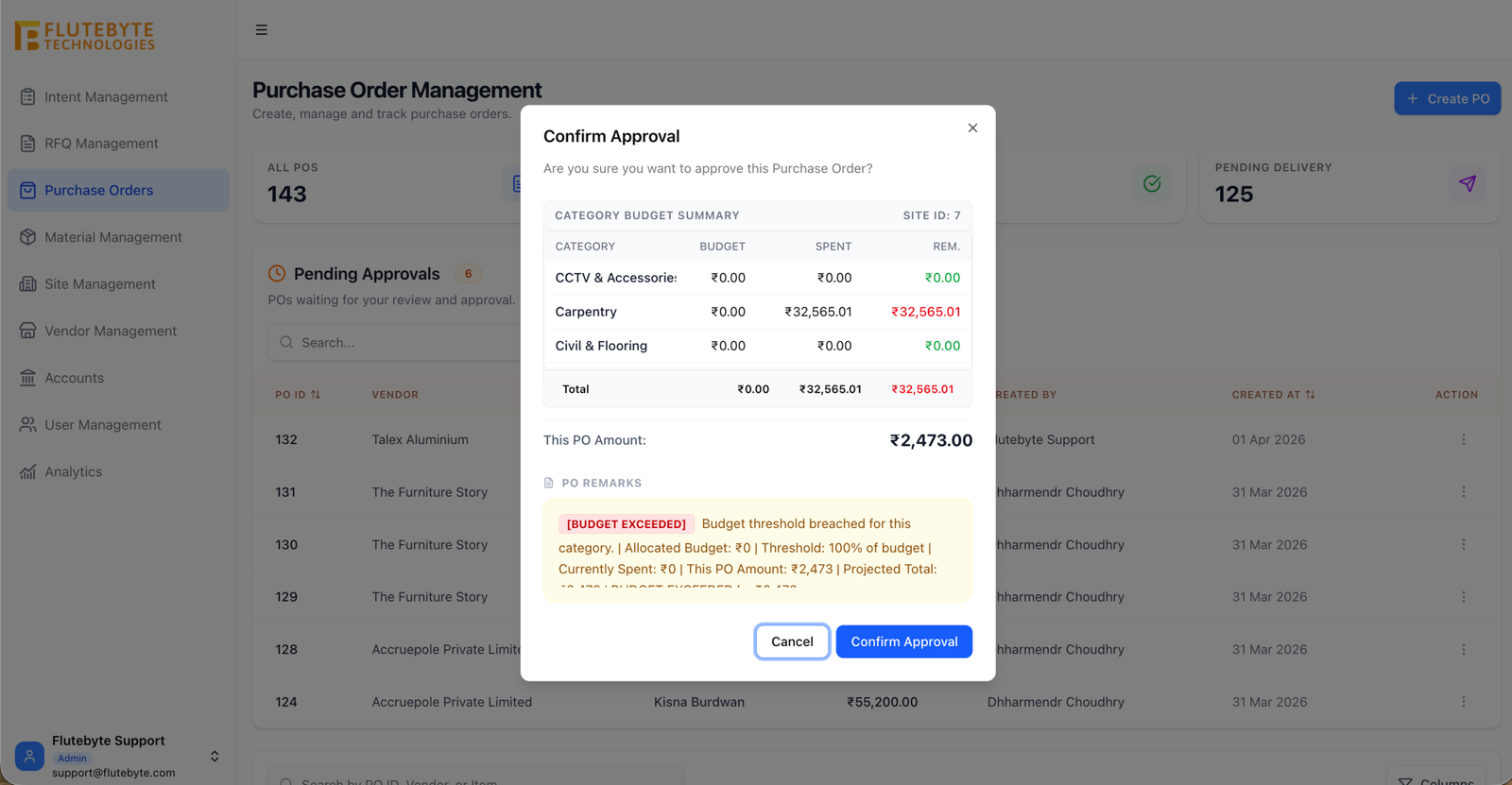
BOQ Lock Screen
Shows final approved BOQ with lock status so other teams use only the approved version.
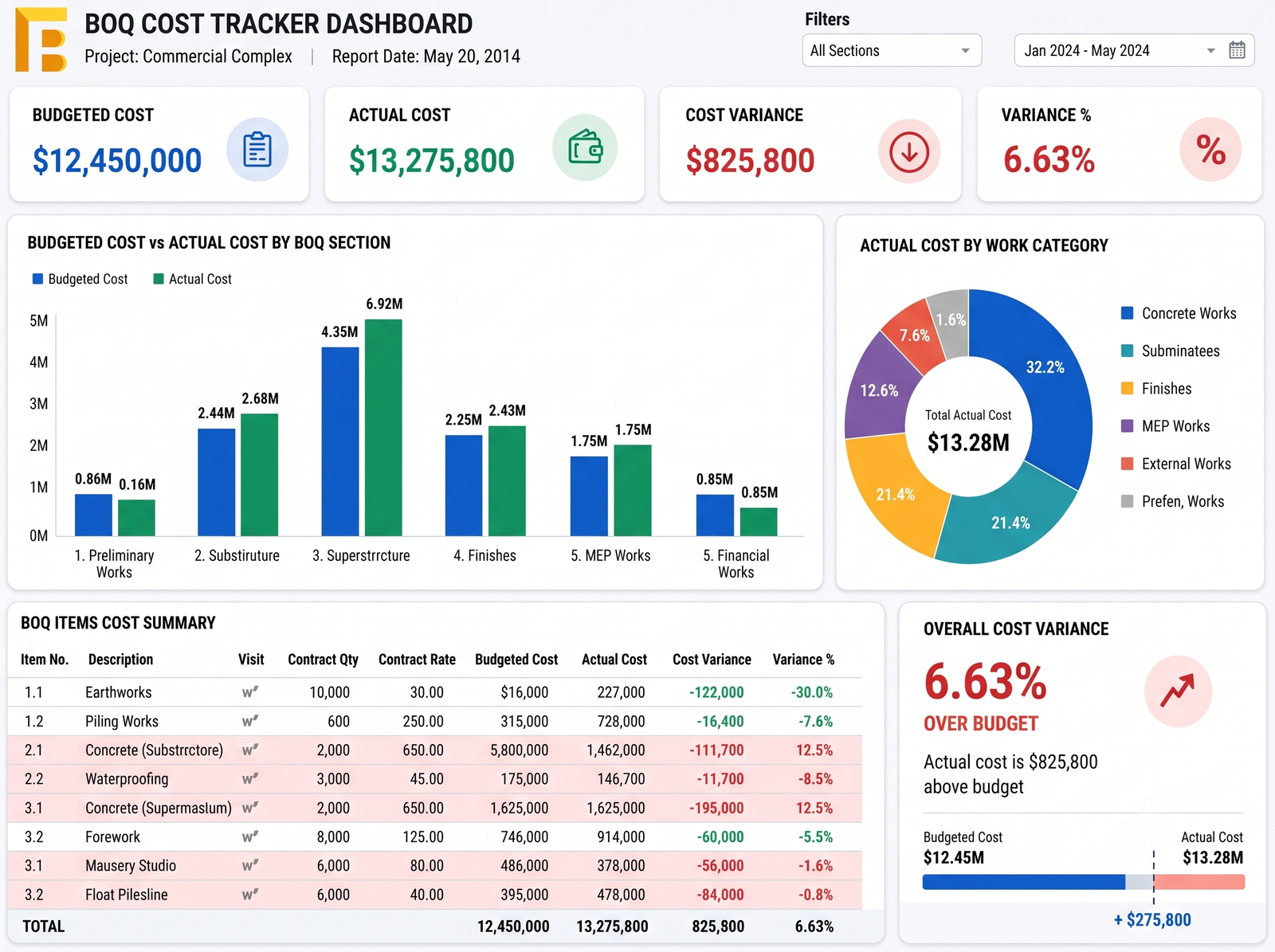
Budget vs Actual Report
Compares approved BOQ value with actual purchase, labour, site expense and vendor bills.
BOQ Reports for Management Control
The BOQ module can generate useful reports for project heads, accounts, purchase teams and management.
BOQ Status Report
Shows draft, under review, approved, rejected and locked BOQs.
BOQ Revision Report
Shows all BOQ changes with old value, new value, changed by and reason.
Approved BOQ Report
Shows final approved BOQ value for each project.
BOQ vs BOM Report
Compares approved BOQ items with material planning.
BOQ vs Purchase Report
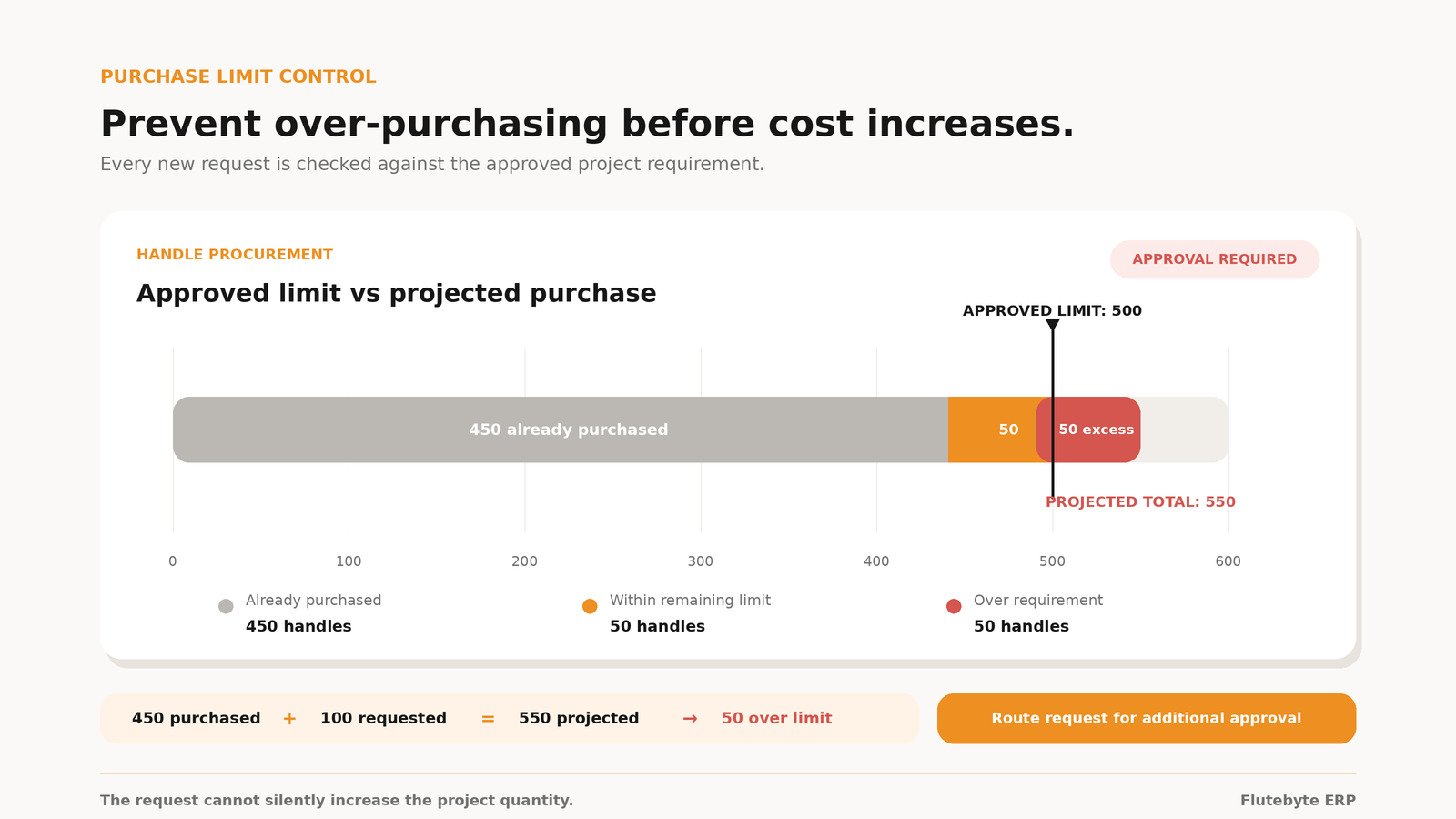
Shows whether purchase is happening as per approved project requirement.
Budget vs Actual Report
Shows approved BOQ budget compared with actual cost.
Project Profitability Report
Shows whether the project is moving within planned margin.
Pending Approval Report
Shows BOQs waiting for management or client approval.
Role-Based Access for BOQ Control
Not every user should have the same access. Flutebyte can create role-based permissions so each team sees and updates only what they are responsible for.
How BOQ Management Software Helps Your Business
Better Cost Control
Approved BOQ becomes the base for budget, purchase and billing.
Fewer Purchase Mistakes
Purchase team can work from approved requirement instead of old Excel files.
Clear Approval History
Every BOQ approval, rejection and revision is recorded.
Better Project Profitability
Management can compare planned BOQ value with actual cost.
Less Excel Dependency
Teams can reduce manual Excel tracking and repeated file sharing.
Stronger Client and Internal Control
Final BOQ versions, documents and approvals stay in one place.
Easier Team Coordination
Estimation, project, purchase, site and accounts teams work from one approved reference.
Built for Interior and Project-Based Businesses
This BOQ module can be customized for companies where costing, material planning and project execution need proper control.
Example: BOQ Control for a Wardrobe Project
A client approves a wardrobe BOQ with fixed specifications. The approved BOQ includes plywood, laminate, hardware, finish, labour and installation cost.
Without ERP
Purchase may work from an old BOQ, accounts may check bills manually, and management may only know the final cost after the project is almost complete.
With Flutebyte BOQ Management Software
- BOQ is created against the project
- Wardrobe line item is added with quantity and rate
- Material, labour, hardware and finish cost are calculated
- BOQ is reviewed and approved
- Final BOQ is locked
- BOM and purchase requirement are created
- Purchase follows approved scope
- Actual cost is compared with approved BOQ
- Profitability is visible to management
Want to Manage BOQ, Budget and Procurement in One System?
Flutebyte can study your current BOQ format, approval process and project workflow, then build a custom BOQ module that fits your business process.
Book a Workflow Discussion