
Inventory Module

Complete Control Over Your Inventory, From Purchase to Consumption

Manage products, variants, stock levels, warehouses, movements, consumption and inventory cost with a flexible inventory management system built around your business process.

Inventory problems increase as businesses grow. More products, more locations, more suppliers, more customers and more departments create complexity. Flutebyte Inventory Management Software helps businesses know:

What stock is available
Where stock is stored
What is reserved
What has been issued
What is consumed
What needs to be purchased
Central Inventory Hub
Total SKUs
2,450
Stock Value
₹48.2L
Low Stock
14 Items
Commercial Plywood 18mm SKU: PLY-18-COM
In Stock
450 Sht
Lounge Sofa - Executive SKU: FUR-SOF-02
Reserved
12 Nos
Copper Wire 2.5 sqmm SKU: ELE-WIR-25
Reorder
15 Coil
Just Now GRN Generated: +50 Units

Why Businesses Lose Control Over Inventory

Select a common inventory failure point below to see why spreadsheets and basic software break down under real-world complexity.

We have inventory, but we don't have visibility

You might maintain stock records, but struggle to answer basic operational questions. Without clear visibility, you base critical purchasing and commitment decisions on assumptions.

Which warehouse holds this specific product?
Which items are already reserved for projects?
Which products are moving slowly?
Physical vs System Mismatch Detected
System Stock 650 Units
Physical Stock 420 Units

Product Variations Make Inventory Difficult

A simple stock system works only when products are simple. Real businesses manage products with multiple distinct attributes like brand, thickness, grade, or GSM.

"Plywood: 1,000 units"
Should correctly display as
Commercial Plywood
Current Stock: 200 Sheets
Century 18mm 8x4 Size BWP Grade

Purchase Happens Without Actual Stock Understanding

Look at a common business cycle: A department requests material. The purchase team orders it. Only later do you discover that the existing stock was available in another location, or the requirement had changed entirely.

New Material Requested
By Site Team
Purchase Order Placed
Procurement ignores unreserved stock
Result: Capital gets locked into unnecessary duplicate inventory while existing material degrades.

Stock Movement Is Not Properly Recorded

Inventory moves through different stages: from the supplier, to the warehouse, to production or the project site, and sometimes back. When you fail to track this movement properly, stock simply vanishes.

Supplier
Warehouse
Record Lost
Site / Dept
Impact: Consumption cannot be accurately calculated, physical counts never match, and fixing responsibility becomes impossible.

What Is Inventory Management Software?

Inventory ERP

Inventory Management Software is a system that helps businesses manage the complete lifecycle of their products and materials, from receiving stock to final usage or dispatch.

The Flutebyte Approach Flutebyte builds inventory systems according to your business logic instead of forcing your process into a fixed format.
Inventory Management Process

Core Features

Main areas controlled by this system

01 Product Master
02 Stock Quantity
03 Product Variants
04 Warehouses
05 Transfers
06 Reservations
07 Material Issues
08 Consumption
09 Returns
10 Adjustments
11 Inventory Reports
12 Custom Workflows

Inventory Workflow Inside Flutebyte ERP

A complete, unbroken sequence tracking your materials from initial setup down to final financial reporting.
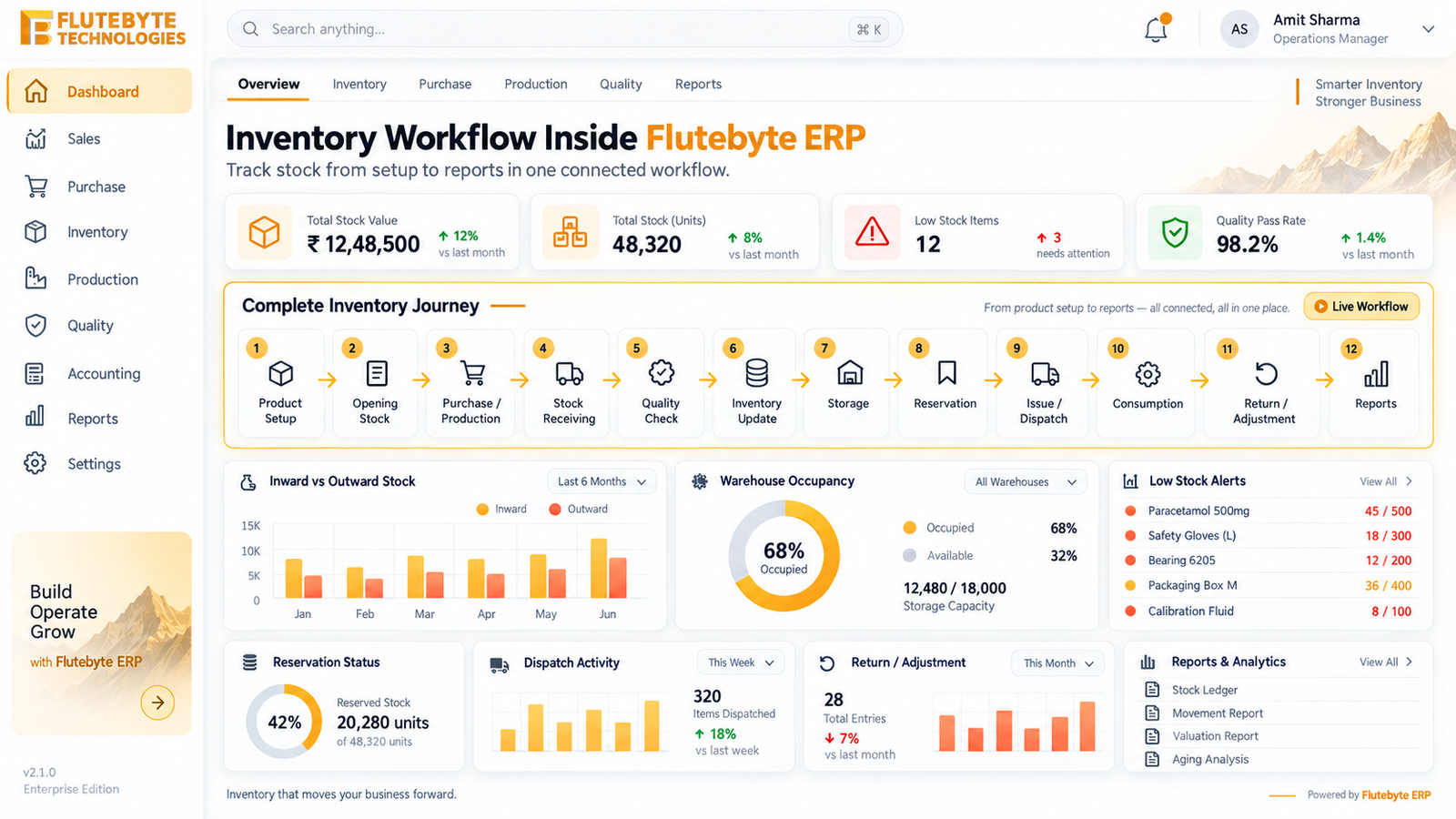
Flutebyte ERP Workflow Interface
01

Product Setup

Define SKUs, BOMs, variants, and base specifications.

02

Opening Stock

Initialize starting quantities and current valuation.

03

Purchase / Production

Generate purchase orders or manufacturing job cards.

04

Stock Receiving

Inward materials at the gate and generate GRN.

05

Quality Check

Inspect received batches; approve or reject items.

06

Inventory Update

System automatically registers the approved available stock.

07

Storage

Assign specific warehouse locations, racks, or bins.

08

Reservation

Lock existing stock for scheduled projects or orders.

09

Issue / Dispatch

Move material to the site, department, or client.

10

Consumption

Record actual material usage against the BOQ.

11

Return / Adjustment

Process excess returns or document site wastage.

12

Reports

Generate real-time analytics on the full lifecycle.

How Businesses Use Inventory Management Software

Furniture Manufacturing

System Manages
Raw Material
Boards Hardware Adhesives
Production
Cutting Assembly Finishing
Finished Goods
Tables Cabinets Furniture Units
Furniture Manufacturing Workshop
Inventory Tracks
Raw material received
Issued to production
Consumption
Finished goods created
Dispatch

Distributor Network

System Manages
Multiple brands Multiple products Multiple warehouses
Distribution Warehouse
Inventory Tracks
Supplier purchase
Warehouse stock
Dealer/customer order
Dispatch
Remaining stock

Interior Business

System Manages
Plywood Hardware Laminates Electrical items Finishing materials
Interior Design Materials
Inventory Tracks
BOQ/BOM requirement
Available stock check
Shortage identification
Purchase
Site issue
Consumption

Create Inventory That Matches Your Products

Every business has different product information. Flutebyte allows you to define exactly what categories and attributes matter to your operations.

Product Categories
Plywood Fabric Machines Electronics Hardware Chemicals
Product Attributes
Brand Size Colour Thickness Weight Grade Model Specification Batch Serial Number Expiry Date
Item Master

Commercial Plywood

Plywood
Current Stock
250 Sheets
Custom Attributes
Brand Century
Thickness 18mm
Size 8x4
Grade BWP

Copper Multistrand Cable

Cable
Current Stock
45 Coils
Custom Attributes
Brand Polycab
Length 100 meters
Gauge 2.5 sq mm
Click toggle above to switch item profiles

Stock Control Workflow Example

When you need material for production, see how the system manages your entire lifecycle from the initial requirement down to actual consumption.

Scenario

Material Purchase and Usage

Hover over the timeline to view the automated control flow.

Step 1
Requirement is created. Need: 500 units
Step 2
Inventory checks availability. Available: 300 units
Step 3
Shortage generated. Required Purchase: 200 units
Step 4
Material received. Stock updated.
Step 5
Material issued. Dept receives required quantity.
Step 6
Consumption tracked. Reconciled
Purchased 200 units
Used 500 units
Remaining 0 units
Wastage Tracked

How Flutebyte Solves Inventory Problems

Central Inventory View

One place to manage your entire physical and operational infrastructure.

Warehouses Branches Departments Projects Production units

Attribute-Based Inventory

Track products accurately according to your specific business requirements, not just generic SKU names.

{ Brand, Size, Grade, GSM }

Stock Reservation

Stop double-booking materials. Clearly separate what is physically available versus what is already committed.

Available Committed

Stock Movement Tracking

Never lose track of a unit. Maintain a rigid audit trail for every single movement.

Who moved it?
When?
Where?
Why?

Inventory Connected With ERP

Inventory does not sit in isolation. It connects instantly with every department to trigger actions and update financials.

Inventory

Industries That Can Use Flutebyte Inventory Software

Manufacturing

Raw material, production and finished goods.

Trading

Products, brands and warehouse stock.

Distribution

Multi-location inventory management.

Retail

Product variants and store stock.

Construction

Material consumption and site inventory.

Interior Businesses

Project material planning and usage.

Engineering Businesses

Components, parts and consumables.

Reports That Help Businesses Take Better Decisions

Stock Availability Report

Know current available inventory.

Stock Movement Report

Track every stock transaction.

Inventory Valuation Report

Know money invested in inventory.

Slow Moving Stock Report

Identify blocked inventory.

Stock Ageing Report

Find old inventory.

Consumption Report

Understand usage patterns.

Purchase vs Consumption Report

Compare buying with actual usage.

Location Wise Stock Report

Manage multiple warehouses.

Why Businesses Choose Custom Inventory Software

Every business operates on its own unique logic. Off-the-shelf software forces you to change your operations to fit the system.

Flutebyte creates inventory software exactly according to your actual operation.
Every business has different
Products
Attributes
Approval Rules
Locations
Reports
Workflows
Integrated By Flutebyte

Frequently Asked Questions

Clear answers regarding our inventory management capabilities.

1. What is inventory management software?
Inventory management software helps businesses track, control and manage products, materials and stock movement from receiving to final usage or dispatch.
2. Can inventory software manage different product attributes?
Yes. Businesses can define their own product attributes such as size, colour, thickness, brand, grade, model, batch and specifications.
3. Can inventory software work for manufacturing businesses?
Yes. It can manage raw materials, production consumption, finished goods and dispatch workflows.
4. Can inventory be managed across multiple warehouses?
Yes. Businesses can manage stock across warehouses, branches, factories and project locations.
5. Can inventory connect with purchase and sales?
Yes. Inventory can connect with procurement, purchase orders, sales orders, dispatch and accounts.
6. Can the system show available and reserved stock separately?
Yes. The system can separate free stock from stock already committed to projects, customers or departments.
7. Can existing Excel stock data be imported?
Yes. Existing product masters and stock records can be migrated into the system.

Want Complete Control Over Your Inventory Operations?

Flutebyte can study your current product structures, stock movement, and warehouse workflows, then build a custom inventory system that perfectly fits your business.

Book a Workflow Discussion
You can start with the core inventory module and later connect it with procurement, production, BOQ, dispatch, and financial reports.