
RFQ Management Software for Interior and Project Procurement
Create RFQs, collect vendor quotes, compare rates, delivery timelines and payment terms before converting approved quotes into purchase orders.
Interior companies often collect vendor quotes through WhatsApp, calls and emails. This makes comparison difficult and increases the chance of wrong vendor selection. Flutebyte helps you manage RFQs in a structured ERP workflow connected with purchase requests, vendors, purchase orders, GRN, QC and reports.
Custom-built for interior contractors, modular furniture companies, turnkey contractors, purchase teams and project-based businesses.
Vendor Quote Problems That Affect Purchase Decisions
Many interior companies receive vendor rates through WhatsApp, phone calls, email attachments and handwritten notes. This creates confusion when the purchase team needs to compare price, delivery, quality, payment terms and vendor reliability.
Vendor Quotes Are Scattered
One vendor sends rates on WhatsApp, another sends PDF, and another confirms verbally. The purchase team has no single place to compare them.
No Item-Wise Comparison
Rates are compared roughly, but item-wise material, brand, thickness, size, finish and GST are not checked properly.
Delivery Timelines Are Missed
A cheaper vendor may delay material delivery, which can affect site or factory work.
Payment Terms Are Not Compared
One vendor may offer better credit terms, but that information is often missed during manual comparison.
Vendor Selection Is Not Transparent
Management may not know why a particular vendor was selected.
Rate History Is Not Maintained
Previous rates, vendor performance and rejection history are not available during new purchases.
RFQ to PO Conversion Is Manual
After vendor selection, the purchase team again creates the purchase order manually, which can lead to errors.
What Is RFQ Management Software?
RFQ management software helps your purchase team create a Request for Quotation, send it to selected vendors, record vendor quotes, compare offers and approve the best vendor before creating a purchase order.
In a custom Interior ERP, RFQ is connected with purchase request, material shortage, vendor master, purchase order, GRN, QC and reports. This helps your team make better purchase decisions with proper records.
For example, if a project needs laminate, hardware and plywood, the purchase team can create an RFQ and invite 3 or 4 vendors. Each vendor can be compared based on rate, brand, GST, delivery date, payment terms and past performance. After approval, the selected quote can be converted into a purchase order.
Manual Vendor Quote Collection vs RFQ Management in Flutebyte ERP
How the RFQ Module Works
The RFQ workflow can be customized based on your company’s purchase process, approval rules and vendor structure. A typical RFQ flow can work like this:
Purchase Requirement Created
The RFQ can start from a purchase request, shortage list, BOM requirement or approved material intent.
RFQ Draft Created
The purchase team creates an RFQ with project code, material details, quantity, unit, required date and remarks.
Vendors Selected
Approved vendors are selected from the vendor master based on category, material type, location or previous performance.
RFQ Sent to Vendors
The RFQ can be shared with vendors through the approved process, such as email, WhatsApp message, PDF or vendor portal if required.
Vendor Quotes Received
Vendor rates, GST, delivery date, payment terms, brand, specification and remarks are recorded.
Item-Wise Quote Comparison
The ERP compares quotes item-wise so the purchase team can review price, delivery, terms and vendor history.
Internal Approval
Management or project head can approve the recommended vendor or ask for re-negotiation.
Vendor Finalized
Once approved, the selected vendor quote becomes the base for purchase order creation.
RFQ Converted to PO
The approved RFQ can be converted into a purchase order without re-entering the same data.
Reports Updated
RFQ status, pending vendor responses, approved vendor, rate history and purchase decision records are updated.
Key Features of RFQ Management Software
RFQ Creation
Create RFQs against purchase request, shortage list, BOM or project requirement.
Project-Wise RFQ
Link every RFQ with project code, material requirement and purchase planning.
Vendor Selection
Select vendors from vendor master based on material category, location, rate history or approval status.
Item-Wise Quote Request
Send item-wise material details with quantity, unit, brand, specification and required date.
Vendor Quote Entry
Record vendor rate, GST, delivery date, payment terms, brand, transport cost and remarks.
Multi-Vendor Comparison
Compare multiple vendors in one view before creating the purchase order.
L1 / L2 / L3 Comparison
Identify lowest rate vendors and compare them with delivery and quality factors.
Delivery Timeline Comparison
Compare vendors based on expected delivery date and urgency.
Payment Term Comparison
Compare advance, credit period, payment cycle and other vendor terms.
Vendor Approval Workflow
Send vendor recommendation for management or project head approval.
Re-Negotiation Tracking
Track revised rates or updated terms received after negotiation.
Quote Validity Tracking
Record quote validity dates so expired rates are not used later.
RFQ Status Tracking
Track draft, sent, quote received, under review, approved, rejected and converted to PO status.
RFQ to PO Conversion
Convert approved vendor quote into purchase order without duplicate entry.
Vendor Rate History
Maintain past rates for future comparison and rate learning.
Document Attachment
Attach quotation PDFs, vendor emails, product brochures, terms and supporting files.
Audit Trail
Track who created, sent, updated, approved and converted the RFQ.
Compare Vendors Before You Approve Purchase
The RFQ module helps your team compare vendors properly instead of selecting a vendor only based on rate. In interior and project businesses, the right vendor decision depends on price, delivery, quality, payment terms and past performance.
| Field | Vendor A | Vendor B | Vendor C |
|---|---|---|---|
| Rate | ₹ 1,150.00 | ₹ 1,210.00 | ₹ 1,250.00 |
| GST | 18% | 18% | 18% |
| Delivery | 3 Days | 5 Days | 2 Days |
| Payment Terms | 30 Days | Advance | 15 Days |
| Rating | 4.5 | 4.0 | 3.8 |
| Recommendation | Best Rate | Better Credit | Fastest Delivery |
Comparison Types
Rate-Based Comparison
Useful when all vendors are quoting the same specification and delivery time is not urgent.
Delivery-Based Comparison
Useful when the site or factory is waiting for urgent material.
Quality-Based Comparison
Useful for finish material, hardware, glass, laminate and other quality-sensitive items.
Terms-Based Comparison
Useful when credit period, advance payment or payment cycle affects cashflow.
Management Approval Comparison
Useful when owner or project head wants to approve vendor selection before PO creation.
Vendor Comparison Fields
Controlled RFQ Approval Before Purchase Order
A vendor quote should not directly become a purchase order without review. Flutebyte can add RFQ approval rules so the selected vendor is approved before PO creation.
RFQ Approval Gate
Approval Control Points
Convert Approved Vendor Quotes into Purchase Orders
Once the vendor quote is approved, the purchase team should not enter the same data again. The approved RFQ can be converted into a purchase order with vendor details, item list, quantity, rate, tax, delivery date and terms.
Auto-Fetched PO Data
Business Value
This reduces duplicate entry, avoids rate mismatch and keeps the purchase order connected with the original RFQ and approval record. Ensuring complete traceability from initial request to final purchase.
RFQ Connected with Your Complete Interior ERP
RFQ gives better control when it is connected with purchase request, vendor master, procurement, purchase order, GRN, QC and reports.
Purchase Request
RFQ can be created from approved purchase requirement or shortage list.
BOM Management
Material requirement can come from approved BOM.
Inventory Management
RFQ can be created only for shortage after checking available stock.
Vendor Management
Vendor master, category, contact details, rate history and performance can be used during RFQ.
Purchase Order
Approved vendor quotes can be converted into purchase orders.
GRN and QC
Material received against PO can later connect with GRN and quality check.
Accounts
Vendor payable can be checked against approved PO and received material.
Reports and Dashboard
Management can track RFQ pending, quote received, selected vendor, price comparison and purchase decision history.
Sample RFQ Screens That Can Be Developed
Final screens can be customized based on your vendor process, approval levels, material categories and reporting needs.
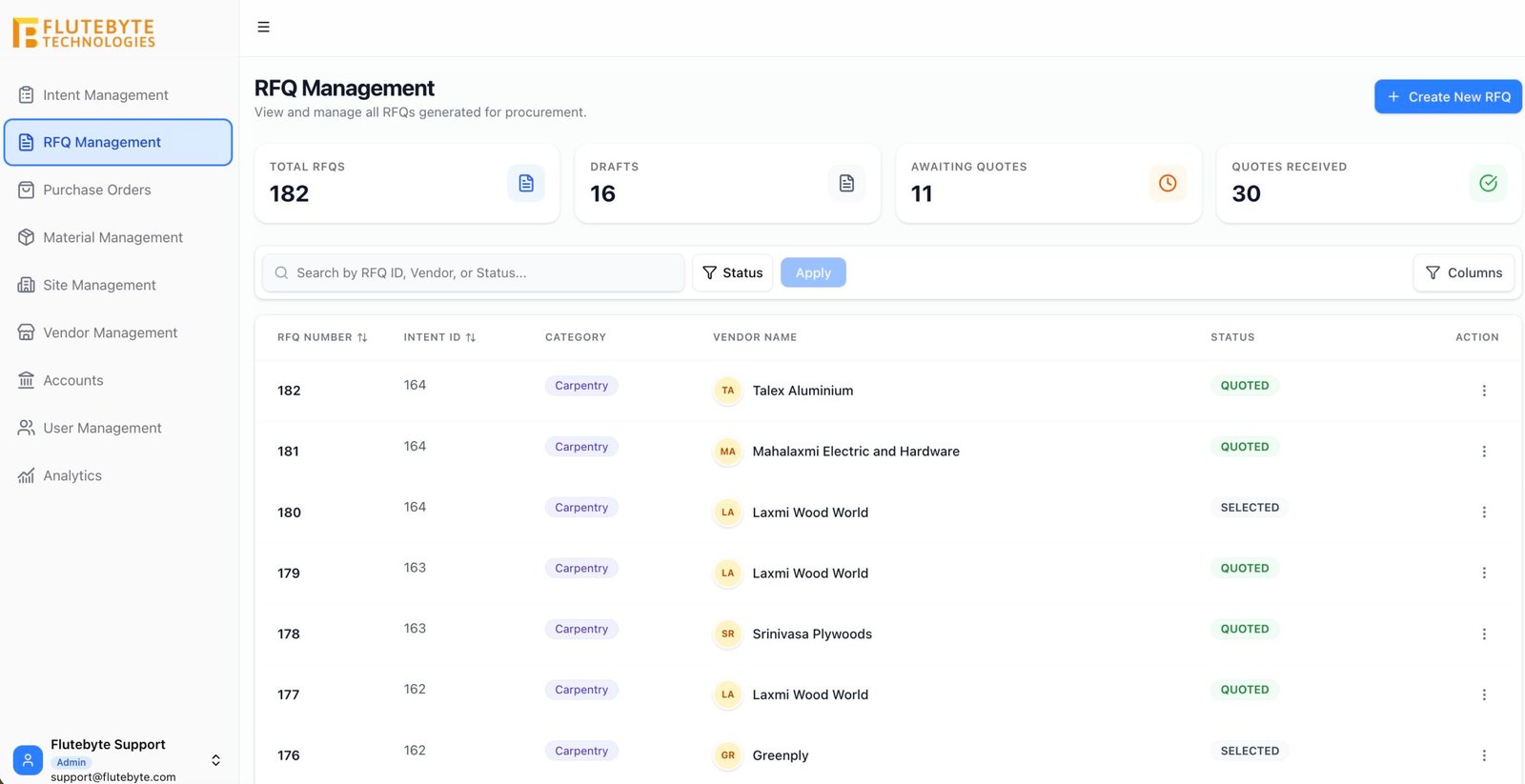
RFQ List View
Shows all RFQs with RFQ number, project code, vendors invited, status, quote received count and approval stage.
RFQ Creation Form
Allows the purchase team to add project reference, material details, quantity, required date and vendor list.
Vendor Comparison Screen
Shows side-by-side vendor comparison before approval.
RFQ Approval Screen
Allows management to approve, reject or ask for re-negotiation.
RFQ to PO Conversion Screen
Creates a purchase order from the approved quote.
3. Vendor Selection Screen
Allows vendor selection by category, location, material type, approval status and previous performance.
4. Vendor Quote Entry Screen
Records vendor-wise item rate, GST, brand, delivery date, payment terms and remarks.
7. RFQ Revision Screen
Tracks revised quote values and negotiation remarks.
9. RFQ Dashboard
Shows pending RFQs, quotes received, pending approvals, approved vendors and converted POs.
RFQ Reports for Better Vendor and Purchase Control
RFQ reports help management review vendor responses, price differences, pending approvals and purchase decision history.
RFQ Status Report
Shows draft, sent, quote received, under review, approved, rejected and converted RFQs.
Pending Vendor Response
Shows vendors who have not submitted quotes against sent RFQs.
Vendor Quote Comparison
Shows rate, GST, delivery date, payment terms and selected vendor side-by-side.
L1 / L2 / L3 Report
Shows lowest, second lowest and third lowest vendor rates for each RFQ.
RFQ Approval Report
Shows RFQs waiting for management approval or already approved.
Re-Negotiation Report
Shows quote revisions and negotiation history before final approval.
Vendor Rate History
Shows previous rates quoted by vendors for similar items.
RFQ to PO Conversion
Shows which approved RFQs have been converted into purchase orders.
Vendor Performance
Shows delivery, rate and quality patterns over time.
Management RFQ Dashboard
Shows total RFQs, pending approvals, quotes received and purchase value. Gives owners and project heads a complete view of procurement activities before orders are placed.
Role-Based Access for RFQ Control
RFQ involves vendor rates, purchase decisions and approval records. Flutebyte can create role-based access so only authorized users can create, edit, approve or convert RFQs.
| User Role | Create RFQ | Edit RFQ | Enter Quote | Approve | Convert to PO | View Reports |
|---|---|---|---|---|---|---|
| Admin Full access to RFQ settings, users and permissions | ||||||
| Management View comparison, approve vendors and review reports | ||||||
| Project Head Review RFQs linked with project requirement | ||||||
| Purchase Team Create RFQ, invite vendors, enter quotes and follow up | ||||||
| Store Team View RFQs related to shortage and material availability | ||||||
| Accounts Team View approved vendor terms and future payable reference | ||||||
| Vendor Access Optional quote submission or document upload access if required |
How RFQ Management Software Helps Your Business
Better Vendor Comparison
Compare vendors based on rate, delivery, GST, terms and performance.
Clear Purchase Decisions
Management can see why a vendor was selected before PO creation.
Less WhatsApp Dependency
Vendor quotes and supporting documents stay in one system.
Faster PO Creation
Approved quotes can be converted into purchase orders quickly.
Better Rate Control
Vendor rate history helps your team negotiate better.
Improved Approval Control
Vendor selection can go through a clear approval workflow.
Fewer Purchase Mistakes
Approved RFQ data reduces mismatch between quotation and PO.
Better Management Visibility
Owners can track pending RFQs, delayed quotes and approved vendor decisions.
Built for Vendor-Driven Interior and Project Businesses
This RFQ module can be customized for companies that purchase material from multiple vendors and need clear quote comparison before placing orders.
Example: RFQ Comparison for Laminate Purchase
A project requires laminate for wardrobes and wall panels. The purchase team needs rates from 3 vendors. Without ERP, Vendor A sends rates on WhatsApp, Vendor B sends a PDF, and Vendor C confirms the price over a call. Later, the team struggles to compare the correct rate, GST, delivery date and payment terms.
With Flutebyte RFQ Management Software:
Purchase requirement is selected
RFQ is created against the project
Vendors are selected from vendor master
Item-wise quote request is sent
Vendor rates and delivery details are recorded
Quote comparison is generated
Management approves the selected vendor
Approved quote is converted into PO
RFQ and vendor decision remain available for future reference
Without ERP
- Quotes scattered
- No clear comparison
- Manual approval
- PO mismatch risk
With Flutebyte ERP
- RFQ created
- Quotes compared
- Vendor approved
- PO created from approved quote
Want to Compare Vendor Quotes Before Creating Purchase Orders?
Flutebyte can study your current vendor quotation process and build a custom RFQ module that connects with purchase request, procurement, PO, GRN, QC and reports.
Book an RFQ Workflow DiscussionYou can start with RFQ management and later connect it with procurement, inventory, vendor management, purchase orders, GRN/QC, accounts and dashboard.
Frequently Asked Questions
RFQ management software helps businesses create Request for Quotation records, invite vendors, record vendor quotes, compare rates and approve vendors before purchase order creation.
It helps interior companies compare vendor rates, delivery timelines, GST, payment terms and material specifications before placing purchase orders.
Yes. RFQ can be created from approved purchase request, shortage list, BOM requirement or material intent based on your ERP workflow.
Yes. Vendor quotes can be compared item-wise by rate, quantity, GST, delivery date, brand, specification and terms.
Yes. The system can show L1, L2 and L3 vendors based on quoted rates. You can also compare delivery time, payment terms and past performance.
Yes. Approval workflow can be added so management or project heads can approve the selected vendor before purchase order creation.
Yes. Once the vendor quote is approved, it can be converted into a purchase order using the approved rate, quantity, tax and vendor details.
Yes. Vendor quotations, PDFs, product brochures, emails, terms and other files can be attached to the RFQ record.
Yes. RFQ reports can be exported in Excel or PDF based on the approved report format.
Yes. Flutebyte builds custom ERP modules, so RFQ fields, vendor comparison format, approval rules, reports and user permissions can be customized as per your process.
Yes. RFQ is an important part of procurement. It usually comes after purchase request and before purchase order.
Yes. The RFQ module can work as part of a complete Interior ERP with BOQ, BOM, procurement, inventory, vendor management, purchase order, GRN/QC, accounts, reports and dashboard.